Introduction

Use this guide in order to replace a SIM card in your BLU Studio 5.0 II. This phone can store up to two SIM cards.

  1. cXXAl1SHoWbmMOyo
    • Turn off your phone before disassembling the device.

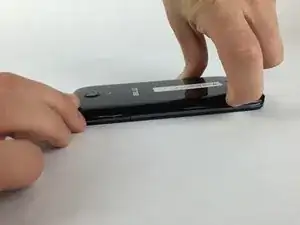
    • Locate the small opening on the bottom corner of the back case.

  2. NpEANhCyHiU1TIBX
    NpEANhCyHiU1TIBX
    ibPBjCLlhh4ADvOY
    • Use your finger to open the back case by slowly pulling it on the open slot.

    • Once the case is lifted on the corner, slide your finger along the edge of the phone to remove the rest of the case.

  3. ON1EGUYfNpJVJGL1
    ON1EGUYfNpJVJGL1
    S5twCHcqfVmZUNTL
    YW6ni3wdNCRHGOCJ
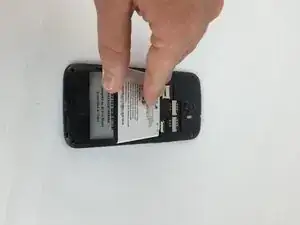
    • Locate the opening slot at the bottom of the battery.

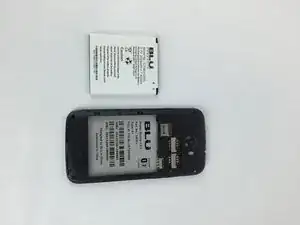
    • Use your finger to lift the battery and remove it from the case.

  4. uThpOH4mlMIYEIVU
    • Locate the SIM Card above the battery.

  5. TypSDDAWyJKUCxYi
    TypSDDAWyJKUCxYi
    BlbjCkDbwnS1qWBL
    • Use your finger to apply a small pressure on the SIM Card.

    • Slide your finger downwards in order to remove the SIM Card from the slot.

Conclusion

To reassemble your device, follow these instructions in reverse order.

Ricardo Sarabia

Membre depuis le 09/02/16

1069 Réputation

3 commentaires

Awesome sauce

charlene hines -

it seems i have  problem geting the phone working through trac phone they its working but cant call out it blu xtreme 2.5 whats up?

anthony -

my phone wont call out tracphone say its working but no its a BLU xtreme 2.5 any answers?

anthony -