Introduction

Prérequis du pad circulaire (joystick).

  1. WciIxkCGqqeSwjDE
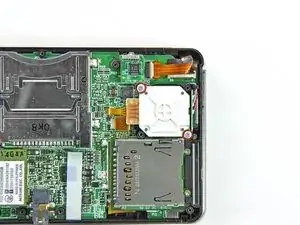
    • Retirez les deux vis cruciformes de 7,7 mm fixant l'arrière du pad circulaire à la carte mère.

    my screws wont stop spining what to i do? i have the same problem with other screws and this leavs my joystick very loss and it is dificult to muve it becuase it is aganst the case not lifted up? any sugestions? (sorry for my bad speling jaja im very bad at speling..)

    AppleTopic -

    I think you stripped your screws. I think the best solution is to change the upper cover of the lower assembly and the screws. The fastest, but temporarily is to stick in some way the joystick housing to the cover, but it won’t last long, so do this only if you have to use your console while you wait the cover to come. Anyway, so not overtighten the new screws, or you will be in the same situation once again.

    Daniele Carminati -

  2. bMBnFDhOIiWPDfD6
    bMBnFDhOIiWPDfD6
    E4TVtF3ttsxMSdVm
    X2gZcTXBxZmTrD5t
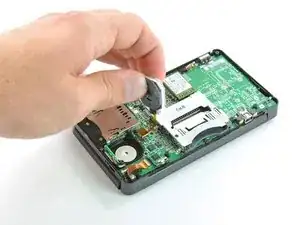
    • Utilisez l'extrémité plate d'une spatule pour soulever l'arrière du pad circulaire de la carte mère.

    • Soulevez le pad circulaire de la carte mère et retournez-le sur le dos, afin que le connecteur de la nappe soit accessible.

    When reassembling verify that the circle pad control is oriented right. I had to go back in after completion when I realized it wasn't centered.

    Daniel Johnson -

    I would not disable the back side all the way because it could really mess up your 3DS.

    masterspeggy3 -

    From this step, follow this video https://youtu.be/XGdRim2Mvrk?t=627

    you can skipp from step 8 to 20

    lots of unnecessary steps

    Bruno N -

  3. IKPPuB5DIoRiDx2E
    IKPPuB5DIoRiDx2E
    SLSbhMgUFDj5mMLx
    aoqcp6SgbWFZPOht
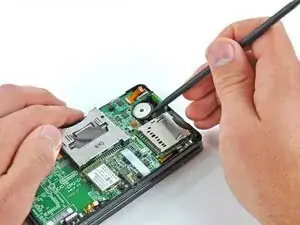
    • Utilisez l'extrémité plate d'une spatule ou votre ongle pour relever le clapet de retenue sur le connecteur ZIF de la nappe du pad circulaire.

    • Assurez-vous de faire levier sur le volet de retenue, et non sur le connecteur lui-même.

    • Soulevez le pad circulaire de la carte mère.

    Can you replace a zif socket? The little metal pieces on mine broke off...

    Colton Alverson -

    YOUR &&^&@@ HAHAHAAHA, no you cant you would have to purchase a new motherboard i feek you bro happened in my first time

    vrobinson -

    you might want to find someone who is skilled in component level microsoldering for that

    Samuel Martin -

    The retaining flap on mine broke off, is there any way to fix it?

    Madi Hansen -

    Don't do this step! it is not necessary. you can skip steps 8 through 20

    S Maduras -

    Skip steps 8 through 20. It will save a lot of time. Thanks S Maduras for the warning.

    clarissa.vetintegral -

    Thanks S Maduras! Your tip

    made this super easy. No need for steps 8-20.

    Carl Vero -

    OH MY GOD THANK YOU SO MUCH!!!! I'm sure I would have destroyed my ds if I did all that

    Amber Selley -

    Just like everyone else I recommend skipping to step 21. You don't need to take all the components out to replace the circle pad.

    Callum M. -

    Skip steps 8-20 like they said!! Doing all those unnecessary steps wasted so so much time and frustrated me hugely by causing me to damage my microphone ribbon cable…

    Falcon -

    What do you mean by skipping 8-20? Do I not need to remove the screws in order to replace the lower LCD?

    Marion Saga -

    you know, after you disconnect the ribbon from the mobo, you can just remove the back discs and the rubber part. no need to go past here.

    TruGoose -

  4. avCvIWYWgJyNbmBI
    avCvIWYWgJyNbmBI
    pYrbGImK2u45deHC
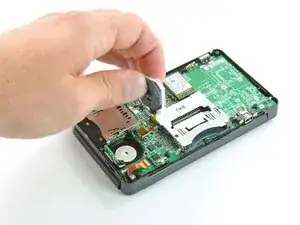
    • Pour éviter de les perdre pendant la réparation, vous pouvez retirer les deux disques fins sous le pad circulaire.

    • Utilisez une spatule ou un tournevis pour soulever les disques et les retirer de l'appareil.

    When reassembling, you can use the pointy end of the spudger to align the hold again with the joystick. It’ll probably have bounced around while you’re moving other things.

    anthonyhersey -

    If your only goal is to replace the circle-pad, the following steps are unnecessary. You can skip to step 21, the removal of the circle-pad.

    Andrew -

Conclusion

Pour remonter votre appareil, suivez ces instructions dans l'ordre inverse.

David Hodson

Membre depuis le 14/04/10

151977 Réputation

0 commentaires