
Introduction
Utilisez ce tutoriel pour calibrer le lecteur d'empreintes digitales sur votre Google Pixel. Ce tutoriel est seulement applicable pour le Google Pixel 6 et les téléphones plus récents.
Vous devez calibrer le lecteur d'empreintes digitales à chaque fois que vous changez l'écran. La plupart des écrans Google Pixel de remplacement vient avec un nouveau lecteur d'empreintes digitales pré-installé. Si vous ne le faites pas, votre lecteur d'empreintes digitales ne fonctionnera pas
-
-
Suivez ces instructions pour activer les options pour les développeurs et le débogage USB.
-
Si vous utilisez un système d'exploitation Windows, téléchargez le pilote USB Google et suivez ces instructions pour l'installer.
-
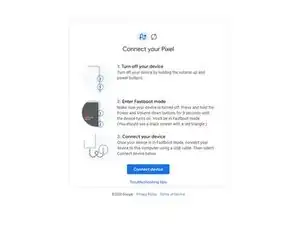
Accédez à cette page pour préparer le logiciel de calibration.
-
Si votre téléphone n'est pas éteint, éteignez-le maintenant.
-
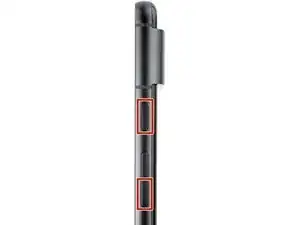
Appuyez sur les boutons de marche et de réduction de volume de votre téléphone pendant 3 secondes pour entrer en mode Fastboost.
-
Connectez votre téléphone à votre ordinateur.
-
-
-
Cliquez sur le bouton "Connecter l'appareil".
-
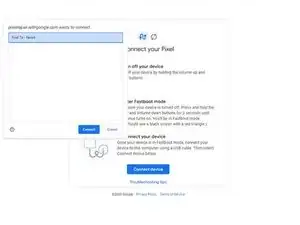
Sélectionnez votre appareil dans le menu qui s'affiche dans une nouvelle fenêtre.
-
Si votre appareil n'apparaît pas, cliquez sur "Conseils de dépannage" près du bas de la page pour diagnostiquer votre problème.
-
Une fois votre appareil connecté, cliquez sur le bouton "Installer logiciel".
-
-
-
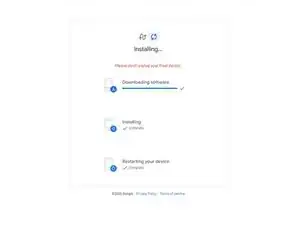
Patientez le temps que le logiciel de calibration se télécharge et s'installe.
-
Une fois que le message "Installation réussie" s'affiche, déconnectez votre téléphone et redémarrez-le manuellement une nouvelle fois pour finaliser la calibration.
-



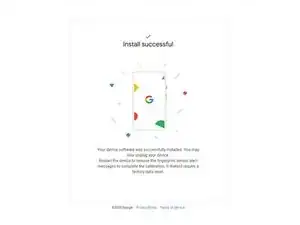

Votre lecteur d'empreintes digitales est calibré et prêt à être utilisé.
Si la calibration échoue, peu importe la raison, répétez la procédure de calibration.

86 commentaires
When I try and use the calibration tool on my Pixel 6 I get an error message whilst downloading the software that says "Couldn't find the unique calibration software for this device". Any suggestions as to what is causing this?
Same problem. Pixel 7 android 14 latest update
Gleb -
Same problem. Pixel 6 android 14 latest update
Same problem, pixel 7 android 14 January update
same problem. Please help
Have you had a screen repaired by a non-authorized warranty repair center? I made that mistake and ran into this error. Google Support basically informed me that I can pack sand. We need right-to-repair legislation so that a software fix such as this cannot be denied.
Same, Pixel 7 android 14. "Couldn't find the unique..."
Solution!!!
Pixel 6a running android 14
You need to connect your phone to a chromebook in order for this process to work.
Instructions worked great
And Dre -
Pixel 7a running on Android 14 lastest update.
Connected my device on a Chromebook and followed the steps as mentioned above. It worked! :-)
After initial reboot by the software, reboot again manually.
After this you should be able to reuse fingerprints as normal.
MZU -
Bonjour et pour les utilisateurs de mac?
Bonjour @nicolasrou74085 malheureusement Apple réserve cette manipulation à son réseau de réparation agréé :( Vous trouverez toutes les infos sur l'appariement de cette pièce dans notre article : https://fr.ifixit.com/News/83553/la-vue-..., en particulier le tableau récapitulatif des iPhone 5 aux iPhone 15 vers la fin de la page.
I am in fastboot mode and my device appears in the list to connect but it consistently comes up with 'Unable to connect device' - I am using Ubuntu 22.10 (Linux) and my Pixel 6 is not rooted. I can't proceed past this point.

I'm in "Fastboot Mode" as described.
A connection to my PC is not yet possible.
A selection menu can be seen on the Pixel 6 display:
- Start
- Restart bootloader
- Recovery mode
- Rescue mode
- Bar code
- Power off
Which option to choose to install fingerprint calibration software?
Andreas -
As mentioned in other sections, this does not work in the latest version of Android. Will likely be updated soon.
Rick Stanley -
I found a comment against the step below that worked for me. That is to enable developer options and then enabling USB debugging:
1. Go into the Pixel 7a Settings > About Phone > Build number
2. Tap build number 5 times to enable developer options
3. Back in Settings > System > Developer options, enable USB debugging.
As soon as I did this, then following the instructions above actually worked.
Roger Wills -
How am I supposed to navigate the menu having the screen just replaced and touchpad not calibrated?
I was lucky to have one enabled prior to the work. Otherwise you could try using OTG adapter with a mouse...
Ilia Nedoluzhko -
It doesn’t work no matter what. There is no software available for the latest version of android
Rad D -
In order to install the USB Driver for Windows 10, I needed to have the phone connected to my PC while the phone was on the fast boot mode, otherwise Windows would keep saying it had the latest driver already. I think this may have achieved a similar outcome to Roger Willis saying they needed to enable USB debugging. This was with Android 14 up to date at the time of writing.
Alberto Einsteino -
I tried Roger Willis and then did as this comment says and it WORKED for me with windows 11 and latest android!! YAY! Thank you!
David Adams -
Similar to other comments. The instructions in the How to Calibrate page should be modified. Steps are missing/in the wrong order. From a Windows machine, you can download the USB driver from Google, yes, but the USB driver cannot be installed to the phone via Device Manager until after you have booted the phone into Faststart mode and then connected to the USB cable. Otherwise it says I already have the latest driver.
Greg K -
Ich habe mehrere PC verwenden, mir die Finger wundgeschrieben um irgendwelche Treiber zu installieren.
Mehrere USB Kabel versucht.
Nichts.
Erst als ich ein USB 3 zu USB3 Kabel versucht habe, lief es erfolgreich ohne einen Mucken.
Können sie gerne weiter geben an den Handyreparatur werkstatt.
War eine interessante Erfahrung 😃
Wilhelm Heinz -
woa!
PLEASE NOTE! Do not click the big blue button "Get started" as it will follow you to a guide that will factory reset your phone.
Instead scroll past this button and click "Install fingerprint calibration software"
Phew!
Mattias Rehn -
I just did these steps with a Pixel 6a with Android 13 and worked perfectly. Only note I want to make is that I connected the phone before being in the Fastboot mode and driver must be installed with the phone in Fastboot mode. Thanks for the guide!
LumberjackSA -
UBUNTU USERS: You have to use Chrome to access this page. Then, you might get an error where it says the device cannot be connected even when it's recognized. This is because there is another step left out of the guide, you won't find out about it until you click 'Google USB driver', which is only described as being necessary for Windows. (I found out because I tried to boot into Windows, clicked that link, then found the note about Linux).
If you are running Ubuntu, at the "install USB driver" step, go here and follow the steps under 'Set up a device for development'. Reposted for posterity:
In terminal
Log out, then log back in
Then in terminal again:
After that, go back to the udfps page and it should successfully connect to your phone this time.
EMC -
Hallo,
habe die Kalibrikation heute auch durchgeführt. Zuerst wollte es mit der Verbindung nicht klappen obwohl das Pixel 7 Pro angezeigt wurde.
Habe mich dann daran erinnert, dass wie auch bei der Programmierung von ESP32 usw. nur ein Fenster von Google Chrome geöffnet sein darf.
Habe dann mein Notebook (Dell) genommen, ein Fenster Chrome geöffnet, die Verbindung kam zustande
und alles lief wie am Schnürchen....
Hoffe ich konnte damit jemanden helfen...
Gruß von Jürgen
J Engel -