
Introduction
Ce tutoriel vous montre comment forcer le redémarrage de l'iPhone SE 2020.
-
-
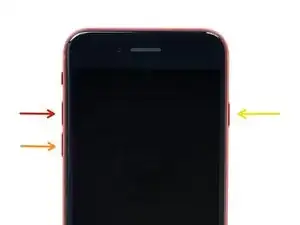
Appuyez et relâchez rapidement le bouton pour augmenter le volume.
-
Appuyez et relâchez rapidement le bouton pour baisser le volume.
-
Appuyez et maintenez enfoncé le bouton de marche.
-
Relâchez le bouton de marche quand le logo Apple apparaît.
-
Pour remonter votre appareil, suivez ces instructions en sens inverse.

4 commentaires
Hi my phone is completely frozen and not responding to this shut down
mine is dead but If it's dead and won't turn on do the force reset and if it tells you to charge it it's a bad charger than
Maby try heating the back of your phone for a few minutes with a hair dryer it worked for me
or try reading this article
My iPhone will not turn on after several hours of charging. HELP?