Introduction

Une custom ROM (ou firmware alternatif ou ROM alternative) est une version d'un système d'exploitation, qui n'est pas prise en charge officiellement par le fabricant d'un produit. Certaines Custom ROMs sont basées sur des systèmes d'exploitation mobile, comme Android, et d'autres sont inspirées de systèmes d'exploitation PC, tel que Manjaro ou Ubuntu. Elles sont différentes des appareils qui utilisent des firmwares d'origine, et peuvent offrir des fonctionnalités qui ne sont pas présentes dans les systèmes d'exploitation d'origine. Elles ne contiennent pas de Bloatware et ne dépendent pas du fabricant pour les mises à jour.

Les Custom ROMs les plus populaires incluent :

LineageOS, LineageOS for microG, Paranoid Android, ProtonAOSP, GrapheneOS et CalyxOS.

Certaines Custom ROMs, comme GrapheneOS et ProtoAOSP offrent un installateur WebUSB qui est plus facile à utiliser pour la plupart des utilisateurs. Mais dans ce tutoriel, je vais parler des de l'installation par commande, qui est une façon plus commune et universelle d'installer (ou flasher) une Custom ROMs.

Attention

  • Déverrouiller le Bootloader va restaurer votre téléphone, donc veillez à faire une sauvegarde préalable !
  • Ce processus peut annuler votre garantie auprès de certains fabricants.
  • Un appareil modifié peut alerter la Play Integrity API (anciennement SafetyNet Attestation API) qui peut causer l'arrêt de services tels que GooglePay.
  • Ce qui peut rendre votre appareil vulnérable face aux hackers, qui pourraient se trouver à proximité de votre téléphone. Donc ne déverrouillez pas le Bootloader sur un appareil qui va contenir des fichiers sensibles.
  • Flasher une Custom ROM peut être risqué et causer des problèmes inattendus, ou même rendre votre appareil hors service. Il est recommandé de n'installer une Custom ROM seulement si vous êtes expérimenté avec Android.
  • Faites toujours preuve d'attention, et lisez les instructions avec soin, lorsque vous déverrouillez le Bootloader de vos appareils, ou que vous installez une Custom ROM. Ne pas suivre correctement les étapes pourrait causer des dommages irréparables à votre appareil.
  • Avant d'installer une Custom ROM, assurez-vous qu'elle est bien compatible avec votre appareil et renseignez-vous sur les éventuels problèmes ou bugs rapportés par les autres utilisateurs.
  • Si vous rencontrez le moindre problème durant le déverrouillage ou l'installation, n'hésitez pas à rechercher de l'aide d'utilisateurs expérimentés sur les forums ou la section support fournie par le développeur de la Custom ROM.
  1. KAHYI5jMmWjWUwQY
    KAHYI5jMmWjWUwQY
    qPOPSWMFSDr12ycl
    CKfbT2kwvb346wEx
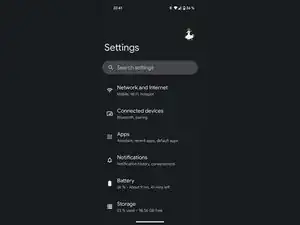
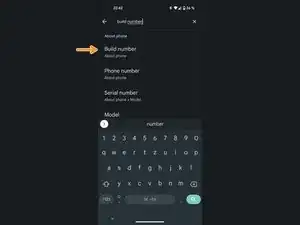
    • Tout d'abord, nous devons trouver le Numéro de version ou Numéro de build selon les téléphones.

    • En général, vous pouvez le trouver dans À propos du téléphone > Numéro de version/build ou Système > À propos du téléphone > Numéro de version/build, comme il varie d'un appareil à l'autre, le plus simple est d'utiliser la fonction de recherche.

    15min-1hour is incorrect for xiaomi phones. for xiaomi phones its 5-7 buisness days

    Filip -

  2. dZljVNRjUgSx2yp5
    dZljVNRjUgSx2yp5
    A6DaFEGyI6mNYl1S
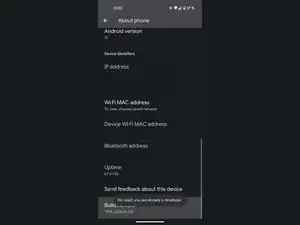
    • Il ne vous reste plus qu'à appuyer plusieurs fois sur le numéro de version ou build, jusqu'à ce que vous obteniez un message de confirmation disant "Vous êtes maintenant un développeur !". J'ai déjà activé les options de développement sur mon appareil, je n'ai donc pas besoin de le faire à nouveau.

    • Vous serez peut-être invité à saisir le mot de passe de votre écran de verrouillage, si vous en avez configuré un.

  3. CYfMStLfhU3LGT6b
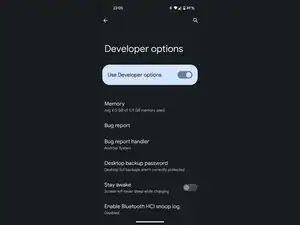
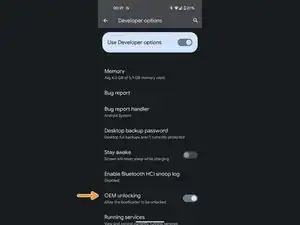
    • Dans les options de développement, trouvez l'option de déverrouillage OEM et activez-la.

    • Vous serez peut-être invité à saisir le mot de passe de l'écran de verrouillage, si vous en avez configuré un.

    I can't enable the OEM on my phone

    Ibsan Furgassa -

  4. FNKXMHl1sYMiMMVY
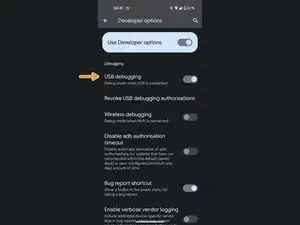
    • Dans les options de développeur, trouvez l'option Débuggage USB (ou équivalent) et activez-la.

  5. D2AwKGELHrj6G1Hl
    D2AwKGELHrj6G1Hl
    E6UE3pqOkVRJQUAU
    • Branchez votre téléphone à votre ordinateur via un câble USB-C vers USB-A.

    • Si votre câble est de mauvaise qualité, vous pourrez rencontrer des problèmes. Certaines appareils n'apprécient pas l'USB en mode fastboot.

    • Faites glisser le volet de notifications et sélectionnez Charger cet appareil via USB.

    • Sélectionnez l'option Transfert de fichiers/Android auto.

    • Sur certains appareils plus anciens, cette option peut s'appeler MTP.

    Well that takes care of that cuz I don't have a regular PC but I will save these directions since Someone is donating a Chromebook to me, I went back to consumer cellular after they went with ATT instead of TMobile also & ATT installed software and what looks like bootloader and something about binding? Permissions say NO or NA but they were allowed to do this anyway! I'm furious

    deb patterson -

  6. JSs6S3EdtJORw3SK
    JSs6S3EdtJORw3SK
    vk2adCqunMswSINu
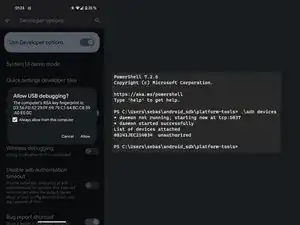
    • Ouvrez l'application terminal de votre ordinateur avec SDK Platform Tools installé et entrez adb devices

    • Cela devrait déclencher l'ouverture d'une pop-up sur votre appareil. Assurez-vous que la case soit cochée et cliquez sur Autoriser.

    • Je n'ai pas ajouté le dossier "platform-tools" au CHEMIN. C'est la raison pour laquelle je dois ouvrir ma fenêtre de terminal dans le dossier platform-tools et entrer .\ comme préfixe à mes commandes.

    • Vous pouvez exécuter la commande une nouvelle fois pour voir si ça a marché. Ca devrait afficher device au lieu de unauthorized.

    PS C:\Users\ADMIN> adb reboot bootloader

    adb : The term 'adb' is not recognized as the name of a cmdlet, function,

    script file, or operable program. Check the spelling of the name, or if a

    path was included, verify that the path is correct and try again.

    At line:1 char:1

    + adb reboot bootloader

    + ~~~

    + CategoryInfo : ObjectNotFound: (adb:String) [], CommandNotF

    oundException

    + FullyQualifiedErrorId : CommandNotFoundException

    help me pls how do I do that

    Lê Minh Khôi -

    Since you probably haven't "installed" the platform tools, you'd have to use the terminal in the folder you downloaded. You could do that by first running the command cd C:\[location of the folder]\platform-tools first and adding a .\ in front of every subsequent command, like I do in the guide images. Alternatively, if you have a current version of Windows 10 or 11, you can actually install the platform tools via the Microsoft Store by running winget install --id=Google.PlatformTools -e

    Sebastian -

    Okay, so how do I get into the terminal mode on my laptop?

    ArlinaEinstein -

    i had gotten the same error as mentioned in above comment. What should I do?

    Riya Dasani -

    I don't have installed platform-tools, What should I do?

    Riya Dasani -

    "draw the rest of the owl" xd

    Jesus Christ -

    i installed sdk platform tools and android studio, but it says "the code execution cannoty proceed becuase AdbWinApi.dll was not found. reinstalling the program may fix this issue"

    Reginald Jackson -

    Have you already tried reinstalling Android Studio? If that doesn't work, you can alternatively use the methods I mentioned in my response to the first comment on this step. You don't necessarily need the full Android Studio suite unless you're developing an app. Using Winget or simply directly downloading the platform tools folder directly is typically a better option.

    Sebastian -

  7. aNayoXwsQqmBED6i
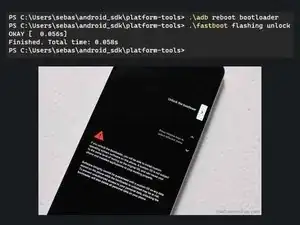
    • Entrez la commande adb reboot bootloader

    • Attendez quelques secondes jusqu'à ce que votre appareil reboote dans le bootloader, puis entrez la commande fastboot flashing unlock

    • Certains appareils peuvent utiliser la commande fastboot oem unlock à la place.

    • Si vous recevez un message d'erreur du style FAILED (remote: 'Failed to unlock, decrypt failed!'), votre téléphone a un bootloader bloqué et nécessite un code de déverrouillage du constructeur.

    • Vous devriez maintenant voir un texte similaire à celui de l'image. Utilisez le bouton du volume pour choisir l'option Unlock the bootloader et confirmez en appuyant sur le bouton d'alimentation.

    Hw long step take

    Josh Chibs -

    for me it says what can i do? and nothing happens

    C:\Windows\System32>fastboot flashing unlock

    < waiting for any device >

    Murathan Kilic -

    That means that it can't find your device. Have you made sure it's properly connected? Maybe a loose connection? If you are using a USB 3 cable, try using a USB 2 cable instead. USB 3 cables can sometimes cause problems. Sometimes you need to install a USB driver for your device as well, but if ADB worked Fastboot should typically work as well without installing any additional drivers.

    Sebastian -

    I get stuck at the fastboot flashing unlock/ fastboot oem unlock step.

    When i use adb reboot bootloader the phone screen does turn on, but show nothing... is that right?

    Also is it ok that my phone disconnects briefly after the adb line?

    oajk -

    The brief disconnect is normal, since the device is rebooting, but it should show a rudimentary interface instead of just showing a blank screen. Doesfastboot device report a device even though the screen shows nothing? If so, maybe you can continue anyways.

    Sebastian -

    I keep getting: "remote: 'the command you input is restricted on locked hw'" What do I do?

    The RadioDemon -

    Are you trying to unlock an Amazon Fire device? I don't really have much experience with more locked down devices, you might find someone who can help you on the XDA Forum or Reddit.

    Sebastian -

    I need help and the command works fine but my phone turns off to show me the menu problem is that my automatic mode is charging only and not file transfer


    Le pro -

    Que puedo hacer si no detecta las teclas de volumen?

    Como le doy en 'yes'?!

    Para aceptar el desbloqueo

    A VTRX -

    My phone is not detected after the reboot to boot loader is done, when execute fast boot command the device not detected in the bootloader mode.

    Soundararajan Soundarapandian -

    PS C:\Users\sound\Downtoads\ptatform—toots—tatest—windows\pIatform—tooIs> .\adb devices

    List of devices attached


    its blank there after when in boot loader cant detect the device

    Soundararajan Soundarapandian -

    In bootloader you need to run ./fastboot devices

    Sebastian -

    when i write reboot bootloader , the phone goes in fast boot but 1 second later it turns on

    ismaele tortora -

    It’s possible that your phone is locked by the manufacturer, which might be why it doesn't enter bootloader mode. This is common with some brands, like Oppo. You might want to check via a quick Google search, if your phone model allows it or if it's restricted by the manufacturer.

    Sebastian -

    i cant enter the bootload by using adb reboot bootloader for my oppo r11,it just normal boot after I type "adb reboot bootloader"

    One star no tips -

    use another method

    Lê Minh Khôi -

    my phone just says downloading , i think its infinitly loading now :/

    Liam Zriouil -

    whenever i do adb reboot bootloader my phone turns off, then turns back on completely blank exept for the words enterring fastboot mode... and it just stays like that for ages, i can turn it back to normal but i cant really progress or do anything with fastboot mode

    DuskDomed -

    I get this: C:\Windows\System32>fastboot flashing unlock

    < waiting for device > I used the cable from usb-c to usb-c and usb-a to usb-c but the same thing happened and when I entered abd reboot bootloader the device restarts but ends up in the bootloader where I just start reboot If I can select bootloader or power off, what do I have to do?

    Eine deutsche Antwort ist auch möglich lg

    finn -

    Same for me as was mentioned above: the phone just freezes in >Fastboot mode...
    I feel that those Chinese mfs just made it like that or it is blocked by the manufacturer

    El Agua -

  8. tm4Ua1NsqUQVpaPC
    • Si votre appareil redémarre après avoir déverrouillé le Bootloader, démarrez via le Bootloader en appuyant sur le bouton de marche et sur le bouton pour baisser le volume, jusqu'à ce que l'appareil redémarre via le Bootloader.

    • Téléchargez le TWRP recovery pour votre appareil ou le mode Recovery qui est fourni avec votre Custom ROM.

    • Entrez la commande fastboot boot [directory]\[nomDuFichierRecovery].img et attendez que votre appareil redémarre en mode Recovery.

    • Sur certains appareils, vous devez rentrer la commande fastboot flash boot [directory]\[nomDuFichierRecovery].img et ensuite fastboot reboot recovery .

    Do I do this download on the computer

    Ian -

    • Dans le menu TWRP, sélectionnez Avancé > charge ADB

    • Avec d'autres Recovery, comme le LineageOS Recovery, l'option devrait se trouver de la sorte Appliquer la mise à jour > Appliquer la mise à jour depuis ADB

    • Téléchargez l'image de l'OS pour la Custom ROM que vous souhaitez installer.

    • Entrez la commande adb sideload [directory]\[nomDuFichierDeOsImage].zip

    • Vous devez faire cela uniquement Si vous souhaitez/devez utiliser les services Google et que votre OS image n'inclue pas de base GApps.

    • Cela ne fonctionnera pas si vous avez déjà redémarré votre appareil.

    • Téléchargez le package GApps que vous souhaitez installer.

    • Répétez l'étape 10 pour réactiver la charge ADB.

    • Entrez la commande adb sideload [directory]\[nomdufichierAppsPackage].zip

    • Si le script vous dit que le niveau API ne correspond pas, même si vous utilisez le bon package GApps pour votre version de logiciel, vous pouvez résoudre ce problème en redémarrant en mode Recovery.

    • Ne démarrez pas dans le système avant d'avoir flashé tous les autres packages que vous souhaitez installer.

    • Certaines Recoveries peuvent vous dire que la vérification a échouée. Vous pouvez ignorer et continuer dans tous les cas.

    • Avec certains appareils, vous pouvez rencontrer des problèmes d'espace de stockage. Vous pouvez résoudre ces problèmes en choisissant un package de GApps plus petit, et installer ultérieurement ce dont vous avez besoin via le Play Store.

    • Cela peut prendre un moment, mais temps que le téléphone ne redémarre pas en boucle, tout devrait bien se passer.

    • Si cela ne fonctionne pas, vous pouvez juste recommencer, en partant de l'étape 8.

Conclusion

Pour restaurer votre appareil dans les configurations d'origine, suivez ces instructions avec un système d'exploitation fourni par le fabricant de votre appareil.

Sebastian

Membre depuis le 19/08/18

27167 Réputation

2 commentaires

The problem is you need the exact customt TWRP recovery AND exact install .zip for the model number. There is no unversal twrp file or universal android, or utbuntu. Each manufacturer, model, useds a 'custom twrp file. and unique identifier for android 'custom' rom even for android itself.

if you install wrong file not for the particular device, it won't work and you need to customized or find the exact model rom known as custom rom. even if the phone is running android. you can only flash the manfucturere rom for that device. or c ustomized it yourself

oem unlocking just means you can FLASH it. most devices now have oem locked and you cannot flash anything on it. improperly flashing wrong rom can brick the device and if there is no custom rom for download, there is nothing you can do. you have make one for yourself which needs the manufacturers drivers etc.

Nexus Nexus -

And you notice there is no technical support about flashing your old tablets or phones from the manufacturere to download and firmware. or download section. Because they don't want people to be flashing and old phone or tablet. You neeed both custom recovery plus 'custom' rom for that operating system to work. and that .zip files is from manufacturer. most people dont have the tech ability to make custom roms or custom android for their device and with so many models and very little demand it's not worth making it.you see droid kits which only works on samsung phones or tablets and they have downloads to reflash it is BRICKED.

Nexus Nexus -