Introduction

Si vous avez oublié le mot de passe de votre ordinateur Mac ou que vous devez créer un nouveau compte administrateur mais que vous ne connaissez pas le mot de passe du compte d'utilisateur administrateur sur votre ordinateur, ou si vous voulez simplement revoir l'assistant d'installation, ce tutoriel vous montrera comment faire croire à votre Mac qu'il n'a jamais été configuré auparavant sans effacer aucune de vos données.

  1. jRKQDj4gPmxUnQG5
    • Éteignez votre Mac

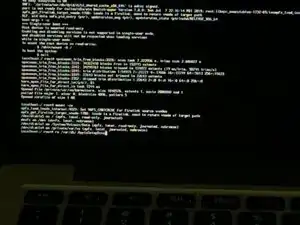
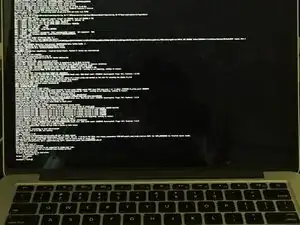
    • Appuyez sur les touches Commande + S et maintenez-les enfoncées, immédiatement après avoir appuyé sur le bouton de march de votre Mac.

    • Il est préférable de commencer à maintenir les touches enfoncées avant que l'écran ne s'allume ou que vous entendiez le carillon de démarrage. Si vous voyez le logo Apple, vous devez réteindre l'ordinateur et recommencer cette étape. À part sur un Mac équipé d'une puce T2, le logo Apple apparaît toujours à la seconde où l'ordinateur s'allume.

    • Vous devriez voir un écran noir avec du texte blanc.

    Como se hace

    Isabel Peralta -

  2. UvXfknYnSjb5ZReP
    • Lorsque le texte s'arrête, vous devriez voir une ligne indiquant « localhost:/ root# » en bas. Si vous ne voyez pas « localhost:/ root# », appuyez sur la touche « Entrée ».

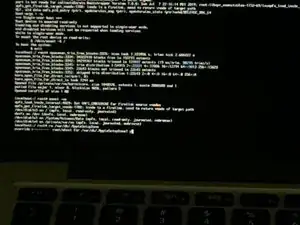
    • Tapez « mount -uw »

    • Du texte supplémentaire apparaîtra à l'écran. Lorsque vous voyez « localhost:/ root# » en bas, passez à l'étape suivante.

    Es funktioniert mit

    mount -uw /

    Theo Wintwer -

  3. rWdfB3dTixCjRTqG
    • Tapez « rm /var/db/.AppleSetupDone » et appuyez sur entrée/retour.

    • Il faut faire attention aux majuscules/minuscules puisqu'il s'agit d'un nom de fichier.

    • Il doit y avoir un espace entre rm et /, sinon vous obtiendrez l'erreur « no such file or directory », rm étant la commande.

    • Cette méthode ne fonctionnera PAS si FileVault est activé sur le disque de démarrage.

  4. FwUSCEACZnHYU143
    • Si vous obtenez un message : « override r------- root/wheel for /var/db/.AppleSetupDone ? », tapez « y » et appuyez sur entrée/retour.

    • Vous pourriez obtenir une erreur qui dit « rm: /var/db/.AppleSetupDone: read-only file system ».

    • Si vous ne voyez pas de message disant « override r------- root/wheel for /var/db/.AppleSetupDone ? », alors passez à l'étape suivante.

    How to fix this error? You may get an error that says, "rm: /var/db/.AppleSetupDone: read-only file system.

    UNITED MUSLIMEEN -

    Sometimes if you start over, it will work but you may be getting the error because you are using a Mac with a T2 chip and it won’t work on Macs with a T2 chip because the T2 chip does not allow write access to the drive.

    Elijah -

    same error, and I found a fix

    If you receive it, it means that this command hasn’t worked: “mount -uw / “

    In my case, I only typed “mount -uw” and hit enter, but you MUST type it all:

    mount -uw /

    including the space and /

    this fixed it for me and I was able to remove the setup file and proceed as described here

    mariya -

    I type mount -uw / but still got the error "rm: /var/db/.AppleSetupDone: read-only

    how can I fix it? I need to reset my imac

    70sunkisses -

    Okay, I figured out a method:

    Type mount -uw / with the space and the slash. Hit return.

    Type mount -uw again with no space nor slash. Hit return.

    Then type rm /var/db/.AppleSetupDone and hit return.

    The only time text will appear is when you type the second line. After the AppleSetupDone line, you shouldn't even have to type Y and then hit return. In fact, nothing should happen.

    If you still can't, type fsck -fy and hit return. This will check your startup volume.

    lyonmissions -

    you’re clutch! thank you! it worked lol

    Willy Avila -

    This one worked for me. Until I hit another roadblock stating that this computer remotely administered by Hudson Pub School. This 2nd time I did not login into my Wi-Fi during setup and it let me create a new admin acct that only I controlled. Now to delete Hudson Pub Schools.

    Paul Paul -

  5. sZf2RdVm431braQX
    • Tapez « reboot » et appuyez sur la touche entrée/retour.

  6. ZsGehLdEemihRAOo
    ZsGehLdEemihRAOo
    TrRREsyVyOwdYQvO
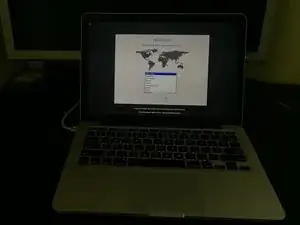
    • Votre Mac redémarre alors dans l'assistant de configuration. Vous pouvez maintenant reconfigurer votre Mac (« de zéro »).

    After step 6, it reboot and going to normal window to enter password rather new admin setup page.. What could be the problem here?

    Ranjith Kumar -

    Did you see a read only file system error when typing in “rm /var/db/.AppleSetupDone” in single user mode?

    Elijah -

    Same problem and i did not get a read only

    Brooke Paeper-Archuleta -

  7. BwvOmQXDQAriAugG
    BwvOmQXDQAriAugG
    ZFEjQpDo5vRVUvn3
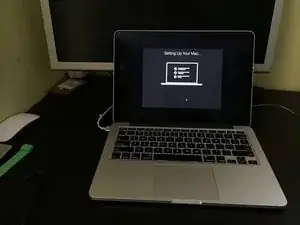
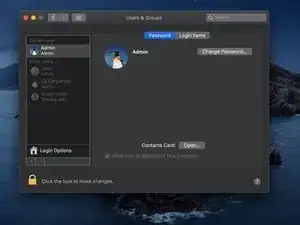
    • Vous avez maintenant créé un nouveau compte d'utilisateur avec un accès administrateur complet. Tous les comptes utilisateurs créés auparavant demeurent inchangés.

Conclusion

Félicitations ! Vous venez de créer un nouveau compte administrateur sur votre Mac.

Elijah

Membre depuis le 16/12/18

1274 Réputation

6 commentaires

What are the steps to overcome the error?

“You may get an error that says, rm: /var/db/.AppleSetupDone: read-only file system.”

dhinostroza -

This error can be caused because FileVault is enabled or that there was some random error. Try running the same commands in Terminal in the macOS recovery partition and see if that works. This error may also occur on a Mac with a T2 chip. If FileVault is enabled, you will have to erase the hard drive/SSD and reinstall macOS if you forgot your password.

Elijah -

i get no such file or directory why ???

Mohamed Barnoussi -

El nuevo usuario administrador que se crea ¿de dónde toma el nombre “Admin” que es el nombre del nuevo usuario administrador?

Horacio Gáñez

Harok Hga -

: /var/db/.AppleSetupDone: read-only file system.",

you have to allow write access to the filesystem,

but only after checking for errors.

On my old MacBookPro, it's written in the system messages:

/sbin/fsck -fy

/sbin/mount -uw /

rm /var/db/.AppleSetupDone

Afterwards, it worked as described

Walter Bastanier -

Hola, crea un nuevo usuario pero las cuentas antiguas se puede acceder sin ingresar el Pasword?

kilian figueras -