
Introduction
-
-
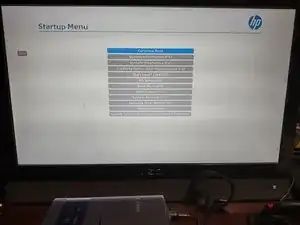
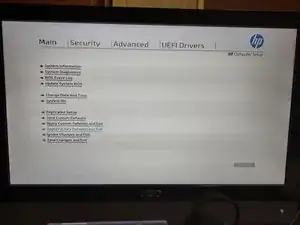
Appuyez sur Échap sur le clavier et sélectionnez Configuration du BIOS (F10). Sélectionnez Restaurer les paramètres d'usine par défaut. L'ordinateur redémarrera et vous serez peut-être invité à entrer un code. CE COMPORTEMENT EST ATTENDU S'IL SE PRODUIT ; il existe une option de présence dans le BIOS commercial HP.
-
Une fois les paramètres réinitialisés, vous n'aurez plus à vous soucier des problèmes liés aux paramètres.
-
-
-
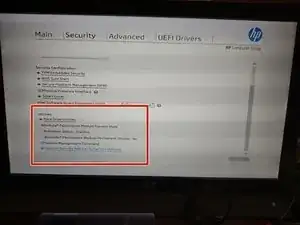
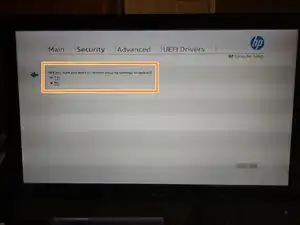
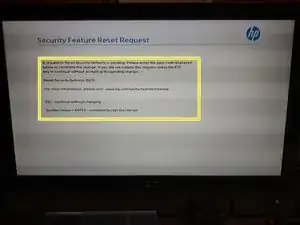
Appuyez sur Échap sur le clavier et sélectionnez Configuration du BIOS (F10). Sélectionnez l'onglet Sécurité et sélectionnez Restaurer les paramètres d'usine par défaut. L'ordinateur redémarrera, puis demandera un code pour réinitialiser le TPM. C'EST UN COMPORTEMENT ATTENDU. Le code ne fonctionnera qu'une seule fois car il est généré aléatoirement
-
Une fois le BIOS et les paramètres de sécurité réinitialisés, vous êtes prêt à installer un système d'exploitation.
-
Pour remonter votre appareil, suivez ces instructions dans l'ordre inverse.

Un commentaire
Reset security defaults (023)
3670 + enter - to complete the change
Esc- continue without changing
For more information, please visit: www.hp.com/go/tech center/startup
Need to know how to get out of this. I want to save the change
Please help
So through much research I found how to reset the BIOS password. This will work if it has not been burned into the bios chip. Disconnect power. Remove the jumper " Blue " and boot it to windows. Then shut it down normally. Then boot into the bios F10 then reset factory defaults and let it boot to windows. Power down normally and replace blue jumper. And boot back into bios to reconfigure it or your preference.
TAZMDVL -