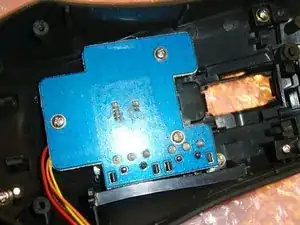
Introduction

Le capteur que ROCCAT utilise pour ses molettes de défilement est très sensible à la poussière et, après un certain temps, il peut commencer à mal fonctionner en ne parvenant pas à enregistrer les actions de défilement ou même en défilant dans la mauvaise direction.

Dans cette vidéo, vous trouverez un bref aperçu du Kone[+] et la manifestation du glitch.

Avant de tenter d'effectuer cette réparation, assurez-vous que le problème est permanent et essayez de le résoudre avec quelques coups d'air comprimé.

  1. SM5jLRWrmeID6ncf
    • Débranchez la souris.

    • Couvrir le capteur optique avec du ruban adhésif.

  2. XNaPvHhaIOHsWslR
    XNaPvHhaIOHsWslR
    qMoi1FSMxFFFqLpP
    • Avec un décapeur thermique/sèche-cheveux, réchauffez les housses. Cela va ramollir la colle qui maintient les patins attachés à la souris.

    • Une fois chaud, essayez délicatement de soulever le patin et de travailler les bords.

    • Pour réappliquer, chauffez les patins pour ramollir la colle, puis maintenez-la fermement en place jusqu'à ce qu'elle refroidisse et tienne sa prise.

    • Une fois que les patins sont retirés, les vis sont bien en vue.

    • Ne touchez pas et ne salissez pas le côté adhésif des patins, sinon ils ne recolleront pas.

  3. pQTVMDHowkYb2yX2
    pQTVMDHowkYb2yX2
    kohmpJIMgfIYRyWY
    • Soyez prudent lorsque vous effectuez cette étape. La plupart des modèles Kone sont dotés de fils reliant les deux moitiés de la coque qui peuvent être endommagés si vous tirez dessus.

    • Retournez la souris et soulevez lentement le capot supérieur.

    • Vous pouvez continuer sans déconnecter les deux moitiés si vous le souhaitez. Assurez-vous que les deux moitiés sont bien maintenues afin que le câble ne soit pas tendu.

    • Utilisez une pincette pour déconnecter les fils. Si votre modèle utilise un câble plat, vous devrez désengager la languette de verrouillage du connecteur avant de retirer le câble.

  4. 3NQQlyldfKvXyPaw
    • Vaporisez le nettoyant pour contacts électriques directement dans l'espace indiqué sur l'image pendant plusieurs secondes, en déplaçant la molette de défilement d'avant en arrière pendant que vous pulvérisez.

    • Une fois le spray nettoyant évaporé, vous pouvez essayer de connecter la souris à votre ordinateur pour tester avant de la remonter. Vous risquez de rencontrer un comportement étrange si vous laissez le circuit imprimé déconnecté pendant cette opération.

    • Si plusieurs répétitions de cette étape ne sont pas efficaces, il se peut que l'encodeur rotatif soit endommagé de manière permanente. Pensez à le remplacer ou à remplacer la souris entière.

    Actually you have to apply the contact cleaner into the plastic box where are those contractors. The arrow points wrong . It point where is the simple mechanism responsible for scrolling tension. The "click" sound when you scroll .

    Bottom line , very big THANK YOU for the guide. Just repaired my friends Kone+ in 10 minutes.

    szwedu -

    Used this to fix my R.A.T 7 scroll problem and it worked like a charm!

    Many thanks.

    MK -

    Worked like a charm on my MMO7. Thank you 100x; I already thought that I will have to buy new mouse..... :)

    Robert Topolovec -

    Or don’t ignore WD-40 if you already have WD-40 electric contact cleaner ;)

    Enio Fernandes -

    1 Roccat Kone[+] fully functional again. +1 for the tip of blowing. It helped to see if it is indeed dust blocking the correct operation. The electric contact cleaner did the rest of the job.

    Jurian Blok -

Conclusion

Pour remonter votre appareil, suivez ces instructions dans l'ordre inverse.

Isip V Nicola

Membre depuis le 14/06/12

560 Réputation

23 commentaires

####WARNING####

You better stick with the hair dryer when warming up the glue of the glidez.

I just performed this guide and it totally worked out. But I used a heat gun to warm up the mouse glidez. Due to the heat, the plastic that shapes the left mouse button, deformed a bit. The mouse is actually working normal, but you need a significant higher force to push the LMB now.

So be careful about the temperatures when warming the glidez.

Beside this fault of mine, the guide is perfect. Mouse wheel glitch is completely gone.

thx.

mmda81

Michael Ungers -

Thanks for the suggestion, already corrected. :)

Isip V Nicola -

Worked perfect with hair dryer and WD-40 in 15 minutes!

rinaf -

Excellent concise guide. Thank You!!!

brenogrady -

Thanks so much, it worked perfectly on a Roccat Savu. The side buttons were not working anymore after a mouse drop.

Just be patient with the glides & the hair drier.

John Doe -

i did it and it works perfectly now!

Alexander Domino -

I am really happy, that i've found that post. PERFECT! Thanks Autor and a man, who pointed out a mistake in Step 5. You should put wd-40, where the green arrow points (not on gear but in a little hole between constant and moving pieces).

soulhunter97 -

I just did it and worked, even if sometimes (really rarely) i scroll one unit and it goes in the other way or doesn't do anything. Hope it will last.

I didn't use the wd40 contact cleaner, but the svitol silikon spray (technik).

In my case, the scroll sensor was all wet (it was something like oil) and the metal circle had (still has) circle stripes, so I just cleaned everything making it all dry, then I added just a bit of svitol

I also added a piece of paper (like in the guide, in front of the scroll wheel) on the left side of scroll sensor, where the metal piece is (the one that makes "tac" when you use the wheel), so it makes more pressure and you won't do an opposite scroll for error (the sensor is very sensible)

Mario -

Hey guys, I can see all of these successful stories and my roccat kova + mmb has been a bit faulty and doesn't always register when I scroll. (weapon changes for ex.) Is there any danger in this method? I have already taken the cover off but im a bit wary of flooding the mouse and im a bit confused where i should put the wd-40 as there is a comment saying to put it some where different so could someone please help me out?

Thanks

Jacob Maschler -

just repaired my Kone[+]Plus after it fell down and the scroll wheel was running free; the axis of the wheel had slipped out of the gearbox. just had to put it all in place again, and removed some wrapped up dog and cat hair on that occasion ;)

was surprised to see it has an extra metal cased switch for the left mouse button, in addition to the micro switch ... chose to buy it because it had not only the most precise wheel mechanics but also the best mechanical clicking sound of all mice i tested in the shop ... now i know why!

thanks for the excellent instructions how to open up this beast!

capsuleerpogostemoncablin -

Hi, what is the name of the component that you point in the picture numer 5 (which it says we have to put wd-40 spray), couse I have a genius bt 905t Bluetooth mouse but this part is broken completely, and i dont know how to ask for it, in a electronic store.

Thanks in advance

Gustavo -

works like a charm! You just saved me a whole new mouse!

Thor -

Thanks for the guide! It gave me the confidence to pull apart my KAIN 120 AMIO to fix the same issue. It wasn’t quite the same process and removing the wheel assembly had me stumped for a minute, so I shot pictures and made a guide for that model based on your guide.

Roccat Kain 120 Amio Scroll Wheel Disassembly

Thanks again. :)

Craig Haydock -

Thanks so much, it worked perfectly for my Kone AIMO Remastered! (I used a hair dryer)

f hu -

Thank you so much! Worked like a charm on my Kone Pure Optical

Pascal -

thank you!

did not warm up the glue, just peeled of the "feets" with a sharp scalpel :)

Dennis jansson -

works perfect on Kone AIMO Remastered. No heat for the pads needed

Teisen -

It works. Thank you so much! :)

Nick Stemmler -

Thank you! Kone Aimo Remastered fixed my scroll wheel issue! I used a hair dryer on low air high heat with a diffuser and worked like a charm.

I also cough discovered that the little blue things on the mouse feet are just protective covers that should have been removed 2 years ago. Wee.

Sean Davis -

it works for kone pure perfectly, and i used nothing but small screw driver (didnt unplug the connection cable)

Orçun Özden -

my scroll wheel now works as intended. the guide was perfect very precise. almost died laughing when it worked, cause i was like ´´bullshit no way that works right. right? but it freaking does haha thank you so much.

emil drest -

I have a question about it has your scroll wheel didnt work if you were moving it up and down cause i have the same issue and does this work with roccat kone xtd its almost the same mouse as this

verygood email -

MY SENSOR IS DEAD!! I guess I used too much and didn't wait enough time?? :( Had scroll wheel issues on Kone xp air. Followed the guide, after everything was done, plugged it back in. The scroll wheel was fixed, but my sensor is dead. Everything else works fine. I also read this on reddit. This guy also destroyed his sensor with WD40 contact cleaner. PLEASE BE CAREFUL. Personally, after reading the reddit post, I would never use WD 40 contact cleaner on a mouse again. maybe just alcohol is enough

S.Holmes -