Introduction

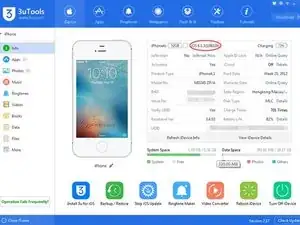
Actuellement, la version V2.17 de 3uTools permet désormais de rétrograder l'iPhone 4s et l'iPad 2 vers iOS 6.1.3 après un jailbreak sans SHSH.

  1. 4Ush2v6EVRHCsV1m
    • Lancez Cydia et installez le repo suivant : http://repo.tihmstar.net pour entrer dans le mode KDFU (veuillez consulter le tutoriel détaillé). Ce n'est que lorsque votre iDevice est en mode KDFU que vous pouvez rétrograder vers iOS 6.1.3. Veuillez vous assurer que votre iDevice est en mode KDFU, puis continuez à rétrograder.

    it says failed to fetch when entering this in.

    WiRed_S3r9ant -

  2. PbGckj5MY6c1YjDh
  3. W6C5NEW2uaioxOnq
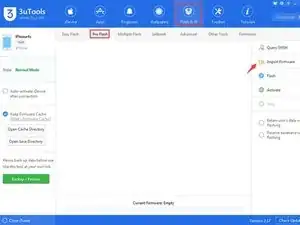
    • Lancer 3uTools et aller dans “Flash & JB“ -> “Pro Flash“, cliquer sur “Import Firmware“ et sélectionner le firmware que vous avez déjà downgradé.

  4. C3W4uBa4dEaW3Ecw
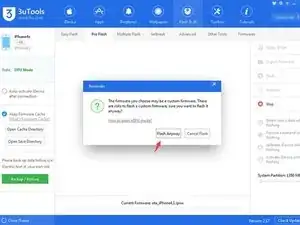
    • Après avoir importé le firmware, cliquer sur “Flash“ dans la barre de droite.

  5. R6JBwQNMJ4KAqFTl
    R6JBwQNMJ4KAqFTl
    WxdQJDCciVWbVPoc
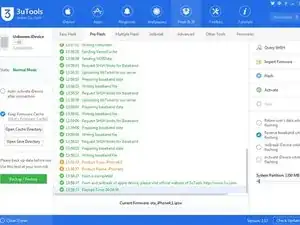
    • Maintenant, 3uTools va automatiquement flasher votre iDevice, veuillez confirmer la connexion entre votre iDevice et votre PC.

    i’m getting stuck on “Sending iBEC component” can someone help?

    Dynovej Hh -

  6. Gp3ZnbVLgwPYlkep
    • Normalement, la rétrogradation prendrait environ 10 minutes.

Conclusion

Pour remonter votre appareil, suivez ces instructions dans le sens inverse.

Grace

Membre depuis le 09/02/17

1750 Réputation

9 commentaires

Great guide! I haven’t tried it out yet, but it looks great!

Naples -

Thanks this worked perfectly!

Joseph -

sending restore confurgation error

berkebarlas789 -

3u Tools is possibly the least reliable method for downgrading, not to mention its data collection and piracy of jailbreak tools such as futurerestore (which is already open source, they just don’t respect the license!), p0sixpwn, and phoenix to mention a few.

hopolapopola -

I cannot access http://repo.tihmstar.net/

Does anybody know if there is any other way of doing it?

Sonic's A Meme -

The tihmstar repo is down. You need to download iFile and then download Kloader through it.

First, download iFile

Then, go to this link (on the jailbroken device) and select "open with iFile" https://web.archive.org/web/201704190628...

Afterwards, select the Kloader thing in iFile and select Installer.

After Kloader is installed, go into Cydia and add this repo. https://lukezgd.github.io/repo

From there, you can download kdfuApp normally. :)

Jovan Topalović -

Hi, I’ve managed to get my iPhone 4s from 9.6 to 9.5… well it seemed to be already imported onto 3utools to begin with so flashing was elementary. Next, I would try experimenting with a specific guide from 3uTools that uses the behind.exe application to first create a IPSW file… interestingly the file I uploaded was already 6.3.1 ISPW, I tried another which was a 954mB zipped file with iOS approval . But still no luck, 45% through RAM disk … gets stuck and I’m not sure if it will complete ever… checkout screenshot below for the screenshot of error message from behind. Any help is desperately appreciated.

Genome roy -

guys this was an stealer if i remember correctly?

CREEPERLOKOYT -

what do you mean

bez -