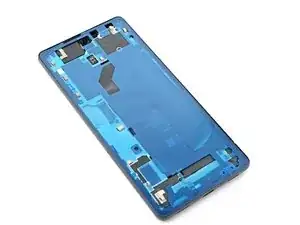
Introduction
Ce tutoriel de réparation a été rédigé par l'équipe iFixit et n'a pas été approuvé par Google. Apprenez-en davantage sur nos tutoriels de réparation ici.
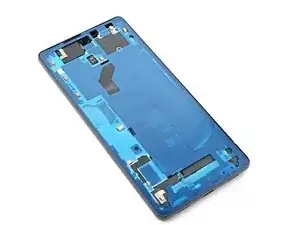
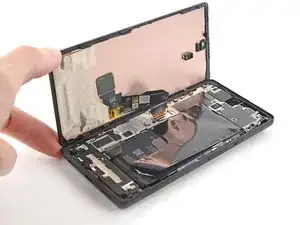
Utilisez ce tutoriel pour appliquer un nouvel adhésif sur votre téléphone après une réparation Google Pixel 6a. L'écran doit être retiré avant de suivre cette procédure. Suivez ce tutoriel pour retirer l'écran Google Pixel 6a si vous ne l'avez pas déjà fait.


-
-
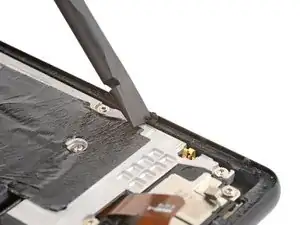
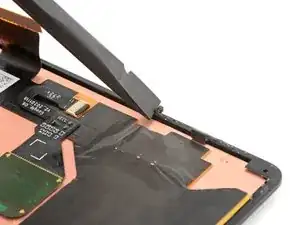
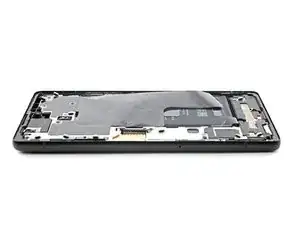
Utilisez l'extrémité plate de votre spatule (spudger) pour gratter autant d'adhésif que possible du châssis.
-
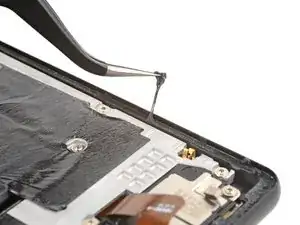
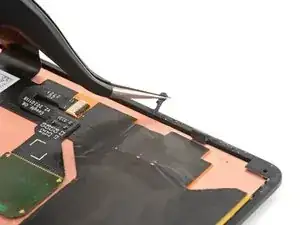
Utilisez une pincette ou vos doigts pour décoller et retirer tout adhésif restant.
-
Nettoyez le contour du châssis avec une petite quantité d'alcool isopropylique fortement concentré (plus de 90 %) et un chiffon sans peluche ou en microfibre.
-
-
-
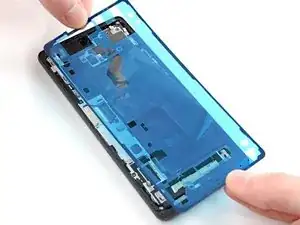
Avant de retirer les films protecteurs, positionnez l'adhésif avec le film transparent vers le bas sur le châssis, pour trouver la bonne orientation.
-
-
-
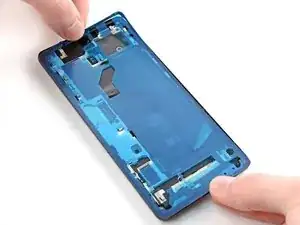
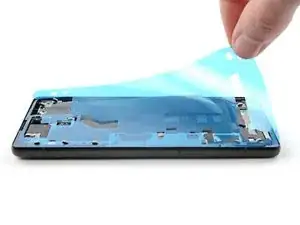
Posez l'adhésif sur le châssis, en commençant par le bord inférieur ou supérieur. Effectuez de petites corrections au fur et à mesure.
-
-
-
Utilisez une spatule ou vos doigts pour appuyer le long du périmètre de l'adhésif et bien le faire adhérer au châssis.
-
-
-
Attrapez la languette d'extraction située dans le coin supérieur droit du châssis et retirez le film protecteur principal.
-
-
-
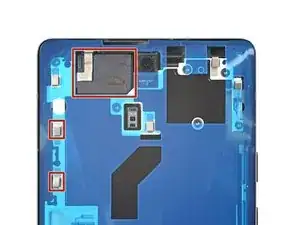
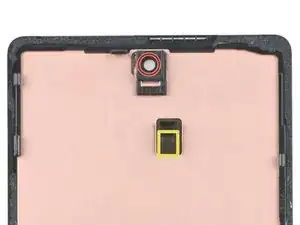
Vérifiez le trou de la caméra frontale sur l'écran de remplacement et retirez tous les films protecteurs restants.
-
Vérifiez la découpe du capteur sur l'écran de remplacement et retirez tous les films protecteurs restants.
-
-
-
Revenez à votre tutoriel de réparation téléphone et reprenez le remontage.
-
Terminez ce tutoriel lorsque votre écran est installé et que vous êtes prêt à refermer votre téléphone.
-
-
-
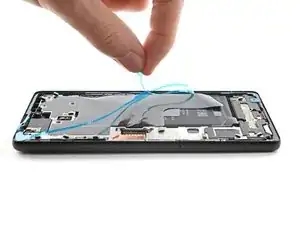
Saisissez la languette d'extraction située sur le bord inférieur du châssis et retirez le film protecteur restant.
-
-
-
Retournez l'écran et placez-le sur le châssis.
-
Appuyez tout autour du périmètre de l'écran pour le fixer en place.
-











18 commentaires
Yup. That worked, Don't rush it, and get a proper suction cup, but i have a perfectly repaired 6a, very happy, and thank you
Great advice, but there must be something I'm missing. Now my phone can't show the screen
When this happened to me, I went back and put the display cable in again. It wasn't done properly. I'm sure you got it fixed by now, but you should not forget the metal bracket too.
Will this provide the same water resistance as the original screen?
Depends on how well you seat the adhesive, but generally speaking, it's very hard to get to the same level of water resistance. It will probably be somewhat resistant.
Water resistance should be treated as an additional protection, not as a feature. Do not submerge your electronic device in water by purpose. (even if it's factory new)
When I cleaned my frame I noticed I had dented 2 corners. I did not have my small file set so I had to improvise. I have a small set of electrical pliers with flat, ribbed sides and a 90 degree bend. I carefully ran these around the corners to get rid of the dents and used the ribbed edge to file them smooth. Would suggest getting a jewelers loop and a set of fine files if you at all suspect the frame/case may have a dent in the corner. Kind of obvious in hindsight - after all I dropped the thing and broke the glass, which got me here making this repair! My only other observation is to use plenty of alcohol - it only temporarily removes the stickiness of the adhesive so as it dries the adhesive re-sticks to the frame.
mark schneider -
fwiw - I found getting the original adhesive off the frame to be near impossible. But I pulled off any clumped up bits. Applying the new liner with adhesive went fine, as did placing the new glass and pressing around the edges to seal it. The seam looks as if brand new (i.e., it's not bigger or open because of too much adhesive). The phone is now in a case and it's not like I'm going swimming with it, so I'm confident the seal is adequate. Of course, YMMV.
Steve -
I found the adhesive very hard to remove. Tried Acertone, Methylated Spitits and Isopropyl Alcohol. I found the Metylated spirits worked best but it still took about 40 minutes to remove all of the adhesive.
Aaran Stent -
I couldn't remove all the adhesive, so just removed as much as I could. Placed the new adhesive on top and phone still seems to hold up well.
Leon -
Work one edge at a time.
Tilt phone so working edge is lowest.
Wet adhesive channel with isopropyl 90%. Tilt will keep it in channel. Wet, not soak.*
While wet, spudge from inner to outer edge, i.e. perpendicular to channel. Adhesive will pill up.
Repeat until adhesive pills are large enough to remove with tweezers or spudger.
When channel is mostly clean, finish by scraping spudger sideways into channel.
Repeat for all sides.
*Idea is that wetting will make adhesive less tacky on surface but remain tacky to the inside. Resulting pills are easier to remove because of the resulting structure
Andrew Olney -
I found tearing a little bit of the alcohol wipe, rolling it into a ball and using the pin head tweezers to rub it along the glue line quite vigorously helped break up the adhesive up.
Richard Collins -
I removed some of the clumps using the tweezers as suggested by other people, given the adhesive is REALLY resistant. I didn't want to take the risk of spilling alcohol or something like that inside. The fit didn't seem to be affected by the new adhesive, which seemed a lot thinner than what was previously there. I wager that my phone will be much less water-resistant now.
YuropeCat -
This part is so difficult and took forever, easily 40 minutes. Here's what worked for me:
1) scrape with spudger a ton. So very much. so much spudging.
2) pull off balled up bits with tweezer.
3) Carefully apply 70% isopropyl alcohol (it's all I had) to edges with q tips.
4) More spudging.
5) Apply more alcohol with spudger tips.
6) Scrape up the adhesive with the plier tips, yeah it's super tedious because they're tiny but you can get a ball going, and then the adhesive starts to stick to itself better than the frame, so it will start pilling up more effectively. Then pull off.
7) Repeat until you want to cry. Eventually it will all come up!
EMC -