
Introduction
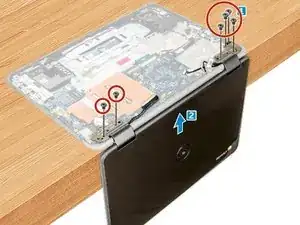
In this guide, we will show you how to remove and replace the Display Assembly.
Outils

-
-
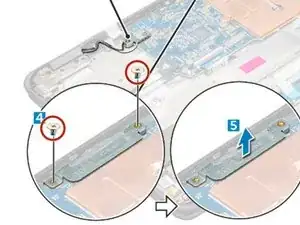
Place the metal bracket over the (display cable) connector, and tighten the M2.0x3.0 screws to secure the display cable to the computer.
-
-
-
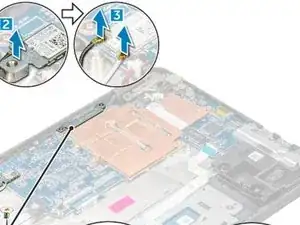
Place the metal bracket, and tighten the M2.0x3.0 screw to the WLAN cable on the system board.
-




Conclusion
To reassemble your device, follow these instructions in reverse order.
2 commentaires
Hola, he remplazado la pantalla. El montaje perfecto pero no enciende. Hay que hacer algo en concreto? Me refiero para que detecte esta pantalla nueva.
Muchas gracias
Keyboard problem 😔 sir
Niraj -