Introduction
Hello!
In this guide I will show you how to remove HDD or SSD in Fujitsu Lifebook E556 laptop!


-
-
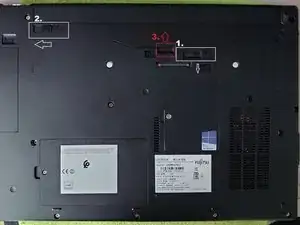
Remove battery:
-
1. Pull down and hold that little tab.
-
2. Move left that slider.
-
3. Pull up to remove battery from laptop.
-
-
-
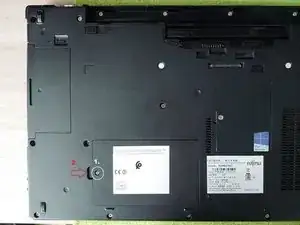
To remove HDD/SSD cover, you need to:
-
1. Remove screw holding cover.
-
2. Pull up the cover by notch visible right next to screw hole. If difficult to pull by finger, use a plastic card or guitar pick.
-
-
-
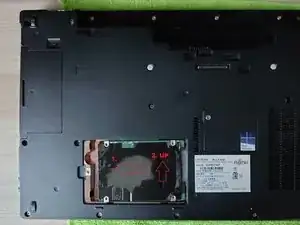
To remove HDD/SSD, you need to pull disk outwards of connector.
-
When disconnected, pull up the disk away from bay.
-
Important! If you wanna place a new disk, make sure it is SLIM format. It is standard for 2,5" SSDs, so nothing to worry about.
-
2,5" HDDs were made in 2 different thicknesses: standard (9mm) and slim (7mm)
-
Mine laptop is lacking two rubber bands, that are holding disk. They're not a necessity, cover has some thick rubber on it too, so disk should stay in place.
-
To reassemble your device, follow these instructions in reverse order.
