Introduction

Tutoriel créé par KimJongIan

Avec l'aide des utilisateurs iFixit Andrew et MervDervis

Ce tutoriel n'existerait pas sans le script créé par tai1976 de gbatemp.net

  1. ZyT1pPiogk6Gknrg
    • Avant d'effectuer toute mise à jour ou changement logiciel lorsque le disque dur est branché à la carte mère, assurez-vous que toutes les connexions de la carte sont sûres, comme le disque dur, sinon vous endommagerez la carte mère et aurez besoin d'une nouvelle.

    Updating the console without the optical drive in place will brick the console? Are we certain about this? I know that the motherboard and optical drive board are paired but didn't think that the console would brick if updated without the drive plugged in. Thanks for the help - Richard

    Richard -

  2. S5xPdf6V2BoXxgXT
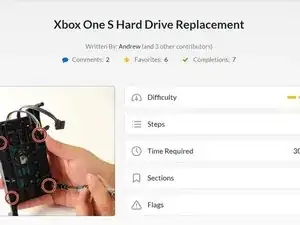
    • Avant de commencer ce tutoriel, il est conseillé de lire les étapes sur la partie matérielle, proposées par l'utilisateur iFixit Andrew, dans le lien suivant.

    • Remplacement du disque dur de la Xbox One S

    • Vous aurez aussi besoin d'un PC sous Windows ainsi que d'un lecteur de disque (Données et Alimentation Sata vers USB)

    • Les disques Seagate sont connus pour causer des soucis avec le logiciel Xbox One.

    The original drive in the Xbox is a Seagate drive. The support forum for the script also does not mention this at all.

    gogocons -

    Seagate drives have been known to cause issues with XBox One software. << what you mean by that … not to by any seagate driver?

    doscarri -

    which hard disk do you recommend

    drkanu198300 -

    Seagate had a bad batch this/last generation. Many of my repairs/replacements were Seagate. Western Digital has been most reliable this decade. Esp the ‘raptor' drives, if not doing SSD.

    Thor -

  3. 41r42uCpFGvGZFpq
    • Branchez le nouveau disque dur au PC. Assurez-vous que le disque dur est à un endroit où il ne risque pas d'être débranché accidentellement.

  4. ITBmEjYMGNG1RaHy
  5. uJWNtpP2o1Z3Usyr
    • Appuyez sur la touche Windows/le bouton démarrer et entrez "CMD", clic droit et choisissez "Exécuter en tant qu'administrateur".

    • Entrez la commande "cd C:\Users\(Votre nom)\Downloads\xboxonehdd-master-6.1\xboxonehdd-master\win".

    • Remplacez (Votre nom) par le nom de votre profil utilisateur.

  6. uGdA2vaxGOYZ6TUu
    • Exécutez la commande "create_xbox_drive".

    • Les prochaines étapes sont la création d'un volume de 500 Go, 1 To ou 2 To de stockage. Si à un moment vous êtes perdu, le fichier readme dans le dossier que vous avez décompressé peut également aider.

    I have a 480 gig ssd. Can this be used with your script?

    Paul -

  7. JOHHeFTQKMeTO5k2
    JOHHeFTQKMeTO5k2
    jajrRROIUQnxgAbc
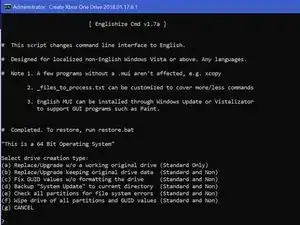
    • Pour ce tutoriel, nous utilisons la première option (a) Replace/Upgrade w/o a working original drive.

  8. 1IO1MGrSwBqQYRNT
    1IO1MGrSwBqQYRNT
    KLRRUhqZytDHxdiK
    5FEMKIZHh6RSROFZ
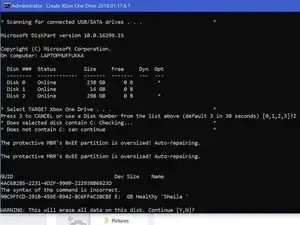
    • Assurez-vous de choisir le bon volume à formater, Disk 0 étant presque toujours votre système d'exploitation, NE CHOISSISSEZ PAS DISK 0.

    • Il vous demandera de confirmer votre choix.

    • Vous aurez ensuite à choisir la taille du volume que vous avez créé.

    What if Disk 0 is your only option?!

    Emily Clark -

    So the computer we are using isn’t even recognizing the drive as being connected. The drive makes noise and lights come on the connector we have but the computer can’t find it. I have no idea what is wrong or how to fix this.

    Emily Clark -

    We figured it out! For anyone else struggling, We ended up having to plug in the USB in the BACK of the computer instead of the front ports. It connected immediately and it’s been a success since (haven’t actually tried it in the xbox yet though)

    Emily Clark -

  9. yjUHlbuOChXc2OAL
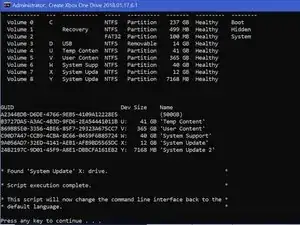
    • Une fois que l'invite de commande affiche 6 longues lignes de nombres avec "GUID" au-dessus, les lignes de commandes sont terminées.

    • Si cela ne marche pas, videz le disque avec diskpart, lien ci-dessous, puis essayez à nouveau.

    • http://knowledge.seagate.com/articles/en...

    i am getting a message saying Missing Drive x: System update.

    i have reformatted the drive and cleaned the ssd with diskpart. but still get the same message.

    Jonathan Murnion -

    Salve, da me non esce found system update ma Missed.. Come risolvo?

    Francesco De Grandis -

  10. ACDsi52GIQaVLZXV
    ACDsi52GIQaVLZXV
    kAK2NmoQ4CMQBHGu
    SwWUrwuh2Q2hOOGK
    • Vous devez vous rendre sur le site officiel XBox pour télécharger un fichier nommé OSU1.

    • https://support.xbox.com/en-US/xbox-one/...

    • Choisissez "Effectuer une mise à jour du système hors connexion. "

    • Choisissez "Xbox One S ou Xbox One X".

    • Cliquez sur le lien vert "OSU1" pour démarrer le téléchargement.

  11. f4NAxODyNZU4hWJs
    f4NAxODyNZU4hWJs
    JvlCxIgAVAKrD4uI
    U1OWLVQBQ55EBIBS
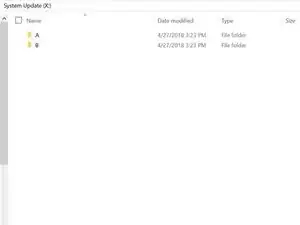
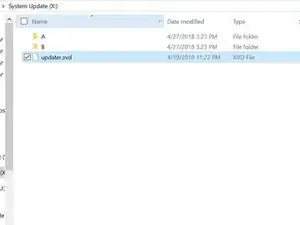
    • Allez dans le disque System Update (X), et créez 2 dossiers, l'un nommé "A"et l'autre nommé "B".

    • Décompressez tous les fichiers d'OSU1, et copiez le tout dans $SystemUpdate, sauf "updater.xvd".

    • Collez ces fichiers dans les dossiers "A" et "B" que vous avez créé.

    • Copiez "updater.xvd" depuis $SystemUpdate et collez-le dans la racine de System Update (X).

    • Notez que vous devrez télécharger le fichier bootanim.dat et le stocker dans les dossiers "A" et "B" également. Il y a deux versions différentes que vous pouvez télécharger, une pour la One/S ou la X. Sans ce fichier la Xbox démarrera avec un écran noir vers le menu et non pas avec le logo de démarrage.

    Where is system update x

    Jonathan Murnion -

    It is created when formatting the new drive in command prompt using the steps above.

    Dale Peters -

    Hello,

    Thank you for the write up as it was very helpful. there are some updated steps needed though. Especially if getting error code E102 and E101. Follow this video ararting at 14:10. https://youtu.be/J1xX6WgJhVA

    Basically I followed your steps and kept failing to load HHD. To find out needed to add the boot animation needing to be added to both A and B filter along with just copy the updater.xvd to the main folder not delete from A and B folder. I still got the E106 error but that's expected. Then next step after restart from E106 error required offline update using OSU1 offline system update from Xbox.

    https://support.xbox.com/help/hardware-n...

    Hope that helps.

    Jeff Brown -

    Where is the bootanim.dat file?

    uBreakiFix Woodbridge ON -

    grazie ifixit seguito passo passo le vostre istruzione funziona al 100%

    xbox one S hdd 500 gb

    grazie e ciaoooooo

    saxon -

    I don’t have enough space on the partition to copy all of the files. How do I fix this? Also, where can I find the bootanim.dat file?

    Jeffrey Russell -

    Hello Jeffrey,

    I had the same issue today. Just connect the old hard drive, opened Disk Management, set it online.

    Then you can copy all files on “System Update (X:)” - drive to the new SSD “System Update (X:)”.

    Turbo -

    I’ve got the same issue, lets me copy files into folder ‘A’ but when pasting into ‘B’ it says there’s not enough space? I am happy to do the offline update with a USB - but do I need to clear everything off the HDD before I run it?

    slcoleby -

    This is not needed anymore. Just skip this step. Just make sure your USB device has the newest software on it. Run the update from the USB when the Xbox asks for it.

    koppie007 -

    Exactly as @dan0 says, you can skip this step. Save the $SystemUpdate file from the OSU1 onto a USB stick and perform as an offline update. Worked a treat! :0)

    slcoleby -

    So step 11 isn't needed if you use the USB $SystemUpdate ? Or are you saying I can just put a new hard drive in the xbox and then use the USB $SystemUpdate to put the operating system on it

    613 Briggz -

    How do I add bootanimations after that?

    Goose Boi -

    HI

    there is no enough space on system update (x) for coping files in both a and b folder

    can you guys help me

    goog tvv -

    its say not enough drive space....this method is total rubbish.

    Prince Formas -

    It seems there is not enough space on System update to copy the files to both A and B - what is the work around as I can’t get the firmware onto the new hard drive I am installing and hitting a brick wall

    Nick Hughes -

    has this question been answered "i am having same issue not enough space on X : System update" to copy the files to both A and B

    partition X: = 12GB if you copy 6.14GB to A and then B X: would have to be over 13GB or is it me that's wrong

    i need to try the above method as the USB pen drive option just keeps giving the E101 code before i bin it

    lanc star -

    Bootanim тут

    https://drive.google.com/drive/folders/0...

    А файлы из папки $SystemUpdate нужно записать на диск только те что ниже и тогда свободного места в разделе будет достаточно и именно в такие директории в раздел SystemUpdate

    A/host.xvd

    A/SettingsTemplate.xvd

    A/system.xvd

    A/systemaux.xvd

    A/systemmisc.xvd

    A/systemtools.xvd

    B/host.xvd

    B/SettingsTemplate.xvd

    B/system.xvd

    B/systemaux.xvd

    B/systemmisc.xvd

    B/systemtools.xvd

    updater.xvd (этот файл в корень раздела SystemUpdate)

    Rad On -

    Ich habe alles gemacht wie es beschrieben wurde.

    Preparing console 50%...

    Habe es mit OSU1 und OSU2 probiert.

    USB stürzt ab...

    WS kann ich noch machen

    Melih Çelik -

  12. KtLkeeTAOBvhRWtV
  13. rWx3oUZV1GJya11L
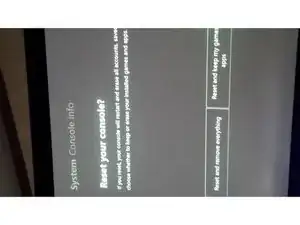
    • Certains utilisateurs ont rencontré des soucis de connexion après une mise à niveau vers SSD. Si cela se produit, réinitialisez simplement la console (gardez les jeux et applis si besoin) et cela règlera le problème.

    • Ceux qui ont paramétré leur XBox en mode "économie d'énergie" au démarrage peuvent obtenir un écran noir de 20-30 secondes avant le démarrage. Changer ce paramètre en "démarrage instantané" règle le problème.

    • Maintenant, jouissez d'une vitesse de lecture et d'écriture 20x plus élevée et de temps de chargement d'une fraction de ceux d'un HDD standard.

  14. 22RjMrO5Iyfmo56i
    • Vous avez maintenant fini, profitez de votre XBox !

    • Note : ceci fonctionne avec les SSD.

Conclusion

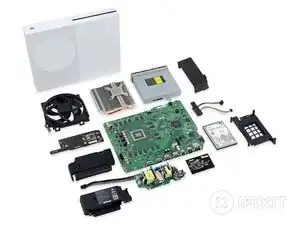
Pour remonter votre appareil, replacez le disque dur dans la XBox One S et réassemblez-la.

KimJongIan

Membre depuis le 27/04/18

1514 Réputation

46 commentaires

It doesn’t work for me. Always “No USB/SATA drives found”. All drives are “online”.

Dennis Becker -

I have the same problem, I can’t decide what to do?

Диск ### Состояние Размер Свободно Дин GPT

-------- ------------- ------- ------- --- ---

Диск 0 В сети 1863 Gбайт 0 байт

Диск 1 В сети 3726 Gбайт 0 байт *

Диск 2 В сети 1863 Gбайт 0 байт

Диск 3 В сети 1863 Gбайт 1863 Gбайт

Диск 4 В сети 223 Gбайт 2048 Kбайт

Диск 5 Нет носителя 0 байт 0 байт

* No USB/SATA drives found *

* Script execution complete.

eshkinin.s -

Works perfect, back up and running… thanks!

dvmath50 -

Doesn't work with soild state drives? Isn't that what's in there to begin with?

Rob Hartwig -

This does work with solid state drives, it doesn’t work, occasionally, with seagate drives.

KimJongIan -

Any reason why we can’t just use Acronis True Image to make a 1:1 copy of the original drive?

Blair Skinner -

This guide is more for replacing a failed drive, so if you are upgrading the drive, then cloning it and resizing partitions is the way to go.

KimJongIan -

Which files go in “A” and which ones go in “B”

grady respess -

i purchased a replacement hard drive from you and it is a seagate !!!!! does not work

Jason Csencsits -

I have a black screen for 20 seconds when starting up. After that I land on the start screen. the quickstart is off. The black screen is also there.

Florian Hunger -

Все работает. Спасибо! Копировал на Crucial MX 500 2TB SSD.

Владимир Рудковский -

this method does not work! please remove this page. thanks.

capthook -

Does this also apply to the Xbox One X?

Ben -

Great guide. works perfect ! great job !

stavru doru-sorin -

Cant i start the xbox in safe mode then update it cause i have the OSU file on a USB

Brennan Beattie -

the master files can not be got there is no response from file trip

jason.redfern -

Guy, Thanks for this post, but you know if this procedure works for Xbox One X?

mritto -

i can not get this to work after running the script adn selecting the drive size i wait for 30 seconds and just get a message saying Missing drive X ‘System Update’ anyone seen this or know how to fix it?

Jonathan Murnion -

Were you able to figure this out? Getting the same issue.. :(

teejays -

it seems like the language of win 10 needs to be us English, did the trick for me

Darkaqua de -

Does this change MAC / Console Id / Xbox Live Device ID?

Shin Godzilla -

This work excelent! I was changed my damaged hard drive for one new, and that’s works and the first time.

Note: For windowos 7 must be use “create_xbox_drive_old”.

Thanks for this guide!

delgado_sntgo -

I’ve done everything like in the tutorial, but in the end I get Error E106. My Console is a Xbox One S, and I am trying to install a mechanical HDD. I’ve erased alleready the original HDD that came with the xbox.

Also I’ve tried installing the OSU 1 files on a flash drive, and selected the option from the troubleshooter to “install offline update” and it diden’t work. what should I do ?

festy22 -

Hey there! I’m turning xbox one on for update process and after 5% it shuts down. Can you help me with this problem?

NGA -

I'm getting the same thing

Erika -

i tried this tutorial in 2 consoles but always shows me the same problem.

I tried with 2 or 3 Hard disk and with 2 xbox One S but i can not.

In the morning 2 xbox have been working good but i need to change one motherboard in one of them. please help. greetings

gelodiaz -

If i replace the Internal SDD and follow the steps here will this fix my OS issue because mine is a insider OS and its poo and bricks the whole box ive tried offline update with osu1 wont recognize the usb and osu 2 is recognizes the osu2 but won’t finish the install. so i was wondering if i can just replace the internal sdd and reflash would that fix my issues or does it lie somewhere else?

Joseph -

Es mas fácil con J-Runner

1.- XBOX One > HDD Tool > Selecciona Disco > Start, espera a que termine el proceso

2.- Instala el Disco HDD / SDD en el Xbox One

3.- Descarga el OSU1 https://support.xbox.com/es-MX/help/hard... descomprime el ZIP

3.- En la PC Formatea una USB NTFS y copia todo el folder $SystemUpdate directo en raiz de la USB

4.- En el Xbox One Solución de problemas > Inserta la USB > Se habilitara la Actualización del sistema sin conexión, espera a que termine y se reiniciara la consola

5.- Sigue las instrucciones de configuración lenguaje, pais, cuenta, etc

Raymundo Pizano González -

A che serve scaricare lo script? Non posso scaricare OSU1 metterlo nella usb e fare tutto dalla xbox?

Corta Monitor -

Great stuff. only problem is… since microsoft has updated the os1. the size is tad bit bigger after you decompress the zip. so when you copy the update files into folder A and B. there is not enough space. the 12gb is not enough. and you cannot extend the hdd size. anyone find a work around?

sultan -

I have the same problem, You can extend the partition so it fits there, If you dont have a partition manager i recomand niubi partition editor

Pavel Matušů -

I’ve gone through the steps with no issues until copying the files into the “b” folder. It states that there is not enough room, I need like 5mb more space. Using a 1tb drive.

Mike Bergstrom -

Hi! You can skip step 11. Just make sure you got the newest Xbox update ready on your USB. Turn on your Xbox with your new Xbox formatted HDD or SSD, and continue with the update on your USB.

koppie007 -

System update partition is 12GB but the files that need to go into A and B folders will not fit in this partition. It is slightly too small. :(

Mark -

It works. But i couldnt use the OSU1 Data. Instead i had to use the Data from System Update (X:) from my old drive. But now it works :)

Jaime Justin Altenrath -

Hi Jaime! You can skip step 11. Just make sure you got the newest Xbox update ready on your USB. Turn on your Xbox with your new Xbox formatted HDD or SSD, and continue with the update on your USB. You can completely skip step 11. Due the newest update, there is not enough space anymore.

koppie007 -

Aktuell (14.0.2024) ist es deutlich einfacher geworden eine SSD nachzurüsten. Die Zip-Datei (OSU1) bei Microsoft herunterladen und auf einem NTFS-formatierten Stick entpacken. Die alte HDD entfernen und eine frische SSD einbauen (Kein Formatieren/Partitionieren nötig!). Nun die Konsole starten und das Wiederherstellungsmenü starten (BIND+EJECT für 15 Sekunden drücken). Nun den USB-Stick mit den Daten einstecken und das Offline-Update auswählen --> Fertig!

Fabian -

ainda é possível utilizar um ssd de 480gb através de script pelo hdd master ?

valdiner oliveira -

Sí, lo es. Puede utilizar un tamaño de disco duro personalizado.

koppie007 -

Does this work with xbox series s?

ariel morales -

Well, tbh I doubt it. The Xbox Series S is using an custom size SSD by default. I don't think this will work with Series S/X only with the Original Xbox One and Xbox One S/X.

koppie007 -

Hey, and thanks for this post because I have learned a ton reading through everyone's comments. I have been trying to install a replacement SSD as my HDD failed. I run the .bat file through cmd admin and all goes well with all 5 partitions being created. X: is only created at 12 GB so yeah. Installing $SystemUpdate files into folders A & B does not work as it requires over 13 GB of space with new CSU1 files. I reinstalled the SSD into the xbox one s and try booting from the USB stick with CSU1 files, but I always get a system error 101 screen. So next I modified the .bat file to create a 15 GB X: drive and then created files A & B and now there is enough space to fit the CSU1 files on X: drive. I then plug the SSD back into the xbox thinking all will be good....... but for some reason the xbox then goes and rewrites the partitions and defaults the X: drive back to 12 GB ....... seriously ugh why. At this point I am at a total loss at how to move forward. Any advice from someone who has experienced this?

Steven -

Hi Steven! What is the size of the SSD? Be sure that you save the $SystemUpdate file from the OSU1 onto a USB stick and perform as an offline update. You can skip step 11. This should work. After this you are good to go.

koppie007 -

Hi,

I appreciate this may be a dead forum so won’t hold my breath but will this work using Windows 11 as well?

I am trying to fix an old console and think that the hard drive may be the issue so just want to put a new one in essentially. I’m not bothered about any of the data on the old console so just thinking to start a fresh with a reformatted drive.

Many thanks,

Will

will thomas -

Hi Will!

Yes, you can use the script with Windows 11. Just follow the steps. Little side note: ingnore step 11. You only need the USB.

koppie007 -