Introduction

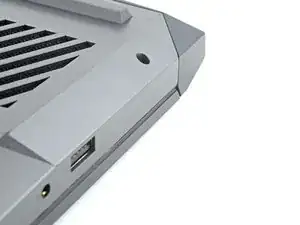
Use this guide to remove or replace the back cover on your Lenovo Legion Y7000P laptop.

  1. VTeYsBRSCCsQVnMi
    • Flip your laptop over so the rubber feet are facing up.

  2. hV1MKDqcMQJ1NQpx
    hV1MKDqcMQJ1NQpx
    rH6HKPHQRKRro2CA
    • Use a Phillips screwdriver to remove the 11 screws securing the back cover:

    • Five 11.5 mm‑long screws

    • Six 4.7 mm-long screws

  3. uJvTfTQdUE6kEsqD
    uJvTfTQdUE6kEsqD
    fknmlKNh4T4xYTIf
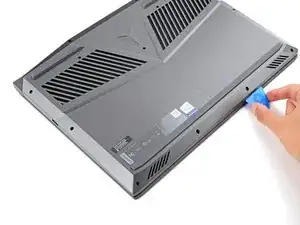
    • Insert the flat side of an opening pick between the top right corner of the back cover and frame.

  4. LrgZoFWnqlf1Pyha
    LrgZoFWnqlf1Pyha
    rWMakKDPr4owVR4x
    DrkjyUy5WbDaGsFJ
    • Plastic clips secure the back cover to the frame. You'll hear and feel them release as you work.

    • Keep the pick angled upwards while sliding to help release the clips.

    • Slide the opening pick down the right edge and around the bottom right corner to release the clips.

  5. IgZAKpirZCUKnCgR
    IgZAKpirZCUKnCgR
    SLLmXNsreEdZQuor
    maBaUaldICwkGLyJ
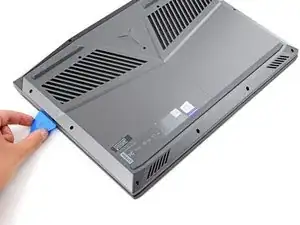
    • Slide the opening pick along the front edge and up to the top left corner to release the remaining clips securing the back cover.

  6. OBkqrEfHPm6wwebZ
    OBkqrEfHPm6wwebZ
    KfsKcUi3gC2dFdV1
    SkfxxcoVAYTmwfFv
    • Remove the back cover.

  7. EiEgdBKqWn2S2I1B
    EiEgdBKqWn2S2I1B
    gJrNrCnIglmRhiv4
    ZYKOTLWPQuCohmpf
    • During reassembly:

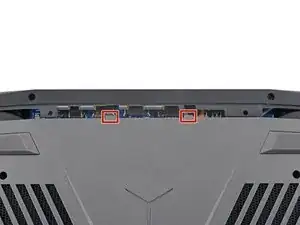
    • Slide the two tabs near the center of the back cover's top edge under the hinge cover.

    • Press down firmly around the perimeter of the back cover to engage all the clips.

Conclusion

To reassemble your device, follow these instructions in reverse order.

Spencer Day

Membre depuis le 14/09/22

87439 Réputation

0 commentaires