
Introduction
Use this guide to replace a dead or dying battery for your Motorola Droid Turbo 2.


-
-
Remove two 4.0 mm T4 Torx screws securing the metal battery bracket.
-
Remove the metal bracket.
-
-
-
Use the angled tweezers to disconnect the small connector near the bottom right corner of the battery.
-
-
-
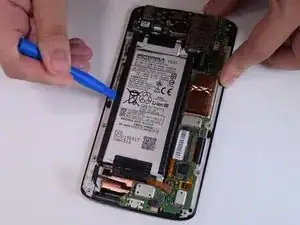
Using a plastic opening tool, unlatch the small black ribbon on the upper right corner of the battery.
-
-
-
Reheat the iOpener and apply it to the battery to help soften the adhesive holding it to the display assembly.
-
Use an old credit card, opening pick, or other flat plastic pry tool to carefully pry out the battery from the adhesive holding it in place.
-


Conclusion
To reassemble your device, follow these instructions in reverse order.
