Introduction

Si vous avez oublié votre code PIN d'écran, votre schéma, votre mot de passe de verrouillage, vous pouvez accéder au menu du téléphone avec votre compte Google installé sur ce téléphone auparavant. Si vous ne pouvez pas le faire, le seul moyen de contourner la sécurité est la réinitialisation d'usine.

!!! Avertissement !!!

Cela effacera toutes vos informations (carnet d'adresses, applications, photos, téléchargements, etc.) !

Il existe deux façons d'effectuer une réinitialisation d'usine avec des boutons matériels. ________________________ Didacticiel vidéo: ________________________

  1. ENHAUOWXUJHhkwJt
    ENHAUOWXUJHhkwJt
    533XLvV4rgYLkRoC
    nf1FHGkQmc6l3OMh
    • Éteignez le téléphone.

    • Appuyez sur le bouton d'alimentation et lorsque vous sentez une vibration, relâchez-le et maintenez enfoncé le bouton d'augmentation du volume.

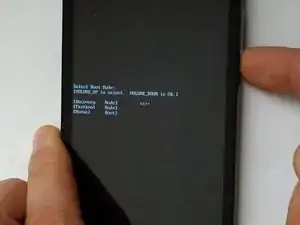
    • Dans le menu du mode de démarrage, sélectionnez [Mode de récupération] (utilisez le volume vers le haut pour la navigation et le volume vers le bas pour OK).

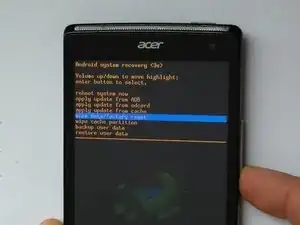
    • Vous êtes maintenant dans le menu connu de récupération du système Android. Utilisez à nouveau le volume vers le haut pour la navigation et le volume vers le bas pour OK et sélectionnez un par un : wipe data/factory reset - Yes -- delete all user data - reboot system now.

    • Cela redémarrera l'appareil et restaurera ses paramètres par défaut.

    I did the second method and its saying no command

    loberets -

    After factory reset, the Medion Tablet-E10714 MD 60216 still ask for (the unknown) pincode before

    factory reset. The waittime between two attems is 950 seconds !!!!!!

    Clear eMMC and Wipe cache partition this not solve this problem.

    Anton Broos -

    Thanks for your help Richard

    1961minerman -

  2. IDgfbPdbyooMnX6v
    IDgfbPdbyooMnX6v
    K2WbijrRkUFYZSdR
    VcGbjbQXPRUxCsR4
    • Éteignez le téléphone.

    • Appuyez sur le bouton d'alimentation et lorsque vous sentez la vibration, relâchez le bouton d'alimentation et maintenez enfoncé le bouton de réduction du volume.

    • L'appareil est maintenant en mode Usine. Utilisez les boutons Volume Haut / Bas pour le mouvement et le bouton d'alimentation pour OK et sélectionnez Effacer eMMC.

    • That's all. The phone will reboot and will be restored to a factory settings.

    • .

    • .

    • Avez-vous réussi?

    Um I just did what you said we should do, but now my phone just turns on to a black blank screen.

    Help please

    Arthur Irons -

    IF A DO THAT THE IT JUS TELLS ME THE eMMC IS BUSY CAN’T FORMAT.

    Sonja Grobler -

    After doing that it ask for a google account which I don't know

    enock Msanzu -

    Yes but after that my sim card lost network

    zawadi pascal -

    My sim card stop working after clear emmc

    zawadi pascal -

    I did it, but in order to use the phone,I'm required to put in the previous pattern or sign in with email.

    I inserted the previous pattern but it say incorrect.

    What to do?

    Ohsee sirleesue -

    Yeah I have used this method before. It worked but this time it says” eMC is busy can't format” . What do I do ?

    Benjamin Ansah -

    It says the emmc is busy and can't format

    Gift Kapito -

    I've done as instructed, after rebooting it gets stuck on the logo "mecer". Does not require any other info

    Innocent Sithembiso Mncube -

    I can get to the boot screen, but no matter what selection I make, it just gives me a solid black screen.

    Jess -

Conclusion

Pour remonter votre appareil, suivez ces instructions dans l'ordre inverse.

ZFix

Membre depuis le 09/12/13

193429 Réputation

22 commentaires

great simple clear instructions - did exactly what you said - phone back up and running good as new! Thanks. M

Marty -

Thanks. The phone has reset.

melandart -

“eMMC is busy can't format, please retry”

What do we do?

richterrea -

Today I also met this message. How did you solve this problem? Thanks, Zoltan (HUN)

Zoltán Bocskai -

HI!, I did the “clear eMMc” method but still my MePop_V03 phone still stock on logo screen.

what should I do?

Please help me .thanks in advance God bless

Herbert Redondo -

Same problem I have, did you find another way to fix it?

Innocent Sithembiso Mncube -

Hi…I did the clear emmc method and my sim card stop working after doing this what should I do.kindly help me thanks in advance

zawadi pascal -

Does not remove the google account synchronized

Mill Lilan -

I can’t select any of the options. the volume up and down both move between the selections, I can’t seem to select.

lila davidson -

Do ypu mean thet it “skips” one selection and you have to double press to make it move?

Daniele Carminati -

After i have done that is still writing emmc is busy

Ayoola Lawal -

My phone shows no comand when I try to do the above process

Nomyongo Michael Ushahemba -

My phone can't reset

Nomyongo Michael Ushahemba -

If anybody fixed the busy emmc error , please help me

Divyanshi Tripathi -

Formating but it says bootdev is busy can't format, please try again

Lea Mae -

Lefagy. Nincs benne SIM kártya. Ez lehet probléma?

Varga Sándor -

Hi i have been facing this issue, eMMC is busy can't format, please retry.

What do i do? Kindly help 🙏

Vaanmayi Chitti -

Bouton d'allumage+ volume bas pour rallumage. Constat: Allumage, écran en chinois. Volume bas, sélection EMMC , bouton "POWER" pour valider. Mais rien. Le bouton power ne semble pas fonctionner. Ecran toujours pareil en chinois. Après sélection EMMC, rien.

mon mail si vous avez la solution: cathy.rosier@gmail.com . Merci.

Cathy -

Kso I've tried multiple different ways to unlock my device when I hold the volume up button with power it brings me to the the picture it shows up there , there's absolutely nothing wrong with my devices buttons but it still won't let me select "wipe data/factory reset"

When I hold volume down/power it brings me to some Chinese menu which I have no clue what it says or does please help me

My device IMEI number says it's Samsung galaxy S21 ultra but then in the YouTube tutorials it's a completely different phone then what I have I think when it powers on it just says" android "

I bought this device online and when I got home and was bout to put my sim card in it it had a pin code on it so I've been trying to unlock it myself.

It does unlock after everytime I turn it on/off but after a few minutes it glitches out and locks me out again even though I've tried putting a new pin code on it I've tried to go to settings and factory reset that way but at the last " erase phone" or w.e it won't let me select it.

krishaedwards97 -

K so If someone can just help me understand what the Chinese menu means or just help me to factory reset my device, like whenever it locks me out again on the screen it says " privacy something on the lock screen

krishaedwards97 -

Take picture and use google translate. I think you bought a fake phone unfortunately. Lyca Mobile sim cards work in these fake phones that often run on 2g networks from the 90’s. Best is to buy the same phone with cash and get apple care. Wait 1 day, disable battery on fake phone and take it back to apple as defective and see what happens. Change sime card trays out if possible.

Csak -

I never see emmc how can i do

Mustapha sani Ibrahim -