Introduction
Lorsque vous jouez sur une Nintendo Switch, chaque bouton a une fonction spécifique. Si l'un de ces boutons est bloqué, cela rend votre gameplay incomplet. Cela peut devenir très irritant et gênant, mais il est possible d'y remédier rapidement. Avec un tournevis et une pincette, vous pouvez résoudre vos problèmes de boutons bloqués. Ce tutoriel fournit des instructions étape par étape sur la façon de réparer rapidement vos boutons ZR et ZL bloqués sur votre manette Nintendo Switch. Ces boutons sont situés sur les côtés droit et gauche de votre console, sur les manettes. Parce qu'ils sont utilisés très souvent, ils ont tendance à se bloquer et à s'user avec le temps. Une force excessive lors de leur utilisation peut les bloquer, créant ainsi notre problème. Pour réparer ces boutons ZR et ZL bloqués, nous allons suivre 7 étapes simples.


-
-
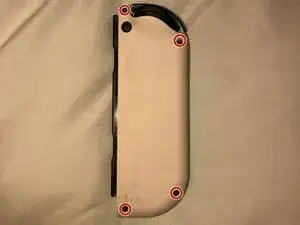
À l'aide du tournevis Tri-Point Y00, retirez les quatre vis M1.4 x 5 mm pour détacher le couvercle en plastique dur de la Joy-Con.
-
-
-
Une fois les vis retirées, soulevez le couvercle pour accéder à l'intérieur du Joy-Con et repérez le bouton ZL.
-
-
-
Cliquez plusieurs fois sur le bouton pour vous assurer qu'il est bien en place et qu'il fonctionne.
-



Après avoir suivi ces 7 étapes, votre gameplay devrait revenir à son état d'origine. Si l'autre Joy-Con a également un bouton ZL ou ZR bloqué, répétez simplement les 7 étapes ci-dessus.

5 commentaires
My spring on the bottom is bent which is causing it to not work, what should l do to fix it? If you know please tell me!
Joe -
My button problem is the actual button on the flexible circuit board. Where can I get a replacement. It simply unplugs from the main board
Gregory -
Hi @gregory53491, I'm not sure what button you are referring to, but here is a link to our parts store with all of the parts we currently have in stock for the Switch JoyCon. If none of the parts we have currently are what you need, you might try checking eBay for used parts. I hope this helps!
Sarah,
The button I was looking for looking for is the ZL button, and I found one on Amazon. I needed the actual on/off smd button. The one one the flexible board. When it comes in I'll give a try at writing a how-to. 👍
Gregory -
Hi Gregory! Thanks for the update. I'm glad you found what you needed to complete the repair :)
My lil brother threw my switch but screen was not broken but the ZL button fell out
Jarrett Swanson -