
Introduction
Welcome to the DC320 Repair Guide, your comprehensive resource for restoring power and performance to your electronic device. Whether you're a seasoned technician or a DIY enthusiast, this guide will walk you through the steps to address common issues and revitalize your DC320.
Outils


-
-
Use the flat end of the spudger to pry the lid off from the two connectors holding it to the body of the dock.
-
-
-
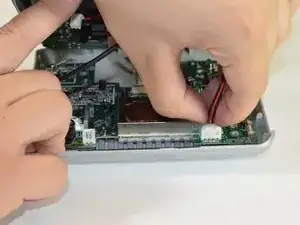
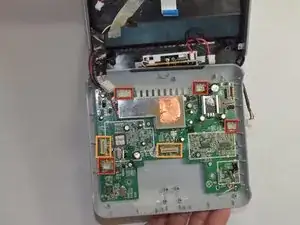
Carefully pull up and out the four electrical connectors and two ribbon connectors that connect the bottom panel to the dock.
-
Electrical Connectors
-
Ribbon Connectors
-


Conclusion
To reassemble your device, follow these instructions in reverse order.
