Introduction
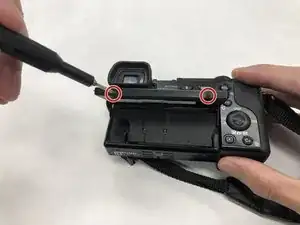
LCD signifie affichage à cristaux liquides, qui est utilisé pour les écrans de différents appareils. L'écran LCD est plus fin que l'ancienne technologie qui offre une meilleure qualité d'image. Ce guide vous montrera avec succès comment remplacer l'écran LCD de votre appareil photo Sony a6000.
Outils

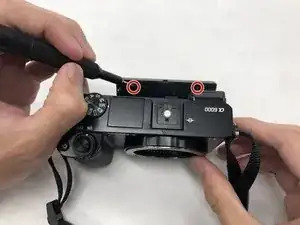
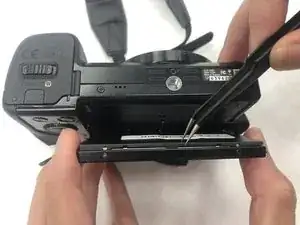
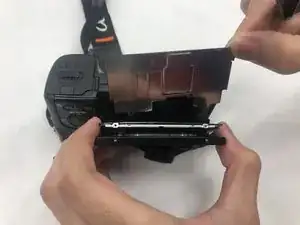



Pour remonter votre appareil, suivez ces instructions dans l'ordre inverse.

2 commentaires
Step 2 makes this repair impossible, the LCD screen is stuck at an angle where it's impossible to get a normal Phillips onto it without stripping the screw. Horribly inaccurate picture of how 'easy' it is to put the screwdriver there. Don't follow this guide.
Saw a bran new a6000 screen on eBay. So, I thought it would be easy to replace the scratched screen from my a6000. WOW was I wrong!
First I would say that step 2 is very hard to accomplish without stripping the screw. You need to pry the screen to get to an angle where it's doable. On my first attempt I striped the screw. I tried it on a second a6000 and successfully could remove the screw.
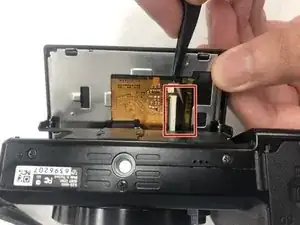
As it wasn't evident to me at first, I think it's important to specify that on step 7 you need to lift carefully the little black flap on the zero insertion force cable connector to unlock it. It's weak and I feel like it would be very prone to breaking.
What is NOT showed on this guide is what comes AFTER step 8! The screen is actually in a plastic frame That does not ship with the replacement screen and this frame is glued! So unless you have plastic glue and are able to unglue it first, you should NOT attempt this repair.
Consequently, I reassembled everything and have resigned myself to living with the scratchs.
Drgonz0 -