Introduction

Le Flipper Zero est un appareil multifonction polyvalent qui est largement utilisé pour hacker du matériel, faire du prototypage électronique, et faire des tests de sécurité. L’une de ses principales caractéristiques est son écran, qui permet aux utilisateurs d’interagir avec l’appareil et de voir des informations. Cependant, si l’écran de votre Flipper Zero est endommagé ou cesse de fonctionner, il peut être nécessaire de le remplacer.

Remplacer l’écran d’un Flipper Zero est un peu plus délicat que de remplacer d’autres composants, car cela nécessite de dessouder l’ancien écran de la carte électronique de l’appareil. Cependant, avec les bons outils et quelques connaissances de base, c’est une tâche qui peut être effectuée même par ceux qui ont une expérience limitée en ce qui concerne la réparation d’appareils électroniques.

Dans ce tutoriel, nous vous guiderons tout au long du processus du remplacement de l’écran de votre Flipper Zero, et notamment sur la façon de dessouder l’ancien écran. En suivant ces étapes, vous pourrez récupérer cette fonctionnalité de votre Flipper Zero et continuer à l’utiliser pour tous vos besoins en hacking de matériel, en prototypage électronique, et en test de sécurité. Alors, commençons !

  1. Allez dans <strong>Main Menu</strong> &gt; <strong>Settings</strong> &gt; <strong>Power</strong>.
    • Allez dans Main Menu > Settings > Power.

    • Sélectionnez Power OFF.

    • Alternativement, vous pouvez appuyer et maintenir le bouton Retour pendant environ 10 secondes.

    • Confirmez en appuyant sur le bouton Droit

  2. raJt3Q3A3mUaV6Jl
    • Éjectez la carte micro SD en appuyant dessus avec vos ongles.

    ifixit PH1 is too big do not buy

    Aeris (AZ) -

  3. fMudNYEZuGtPmk2j
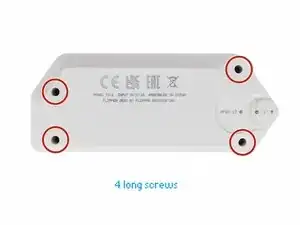
    • Utilisez un tournevis PH1 pour dévisser les quatre longues vis qui maintiennent la partie inférieure du boîtier.

    • Soyez prudents, l'empreinte des vis est facile à abîmer.

  4. YV2JCfLXowDYIEOA
    YV2JCfLXowDYIEOA
    UDeOVehahANEQROx
    XVOGkVrhAaGcRyhx
    • Appuyez des deux côtés au milieu de la partie supérieure du boîtier, un par un, pour détacher les attaches qui maintiennent la partie inférieure du boîtier.

    • Une fois que les attaches sont détachées, vous pouvez retirer la partie inférieure du boîtier.

  5. OVhXKXO5No3kMCUF
    OVhXKXO5No3kMCUF
    cq65MmxLuSRKokd5
    • Utilisez un tournevis PH0 pour dévisser les deux vis courtes qui maintiennent ensemble le châssis et la partie supérieure du boîtier.

    • Une fois que les vis sont retirées, séparez le châssis de la partie supérieure du boîtier.

    the upper one is "long"

    Facu -

  6. GRUiEVAAlCyKXC5H
    • Débranchez la batterie en faisant levier avec précaution sur le connecteur à l'aide d'un Spudger et en tirant dessus.

  7. 1wqYokQOiCJqY34M
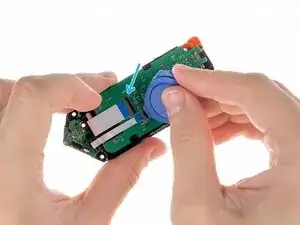
    • Débranchez la large nappe de la carte électronique. Utilisez un médiator en plastique pour soulever le clapet de verrouillage et tirer délicatement la nappe hors du connecteur.

  8. tvvYmWejEIZIkHPB
    tvvYmWejEIZIkHPB
    TrZEWqoOasiMZHej
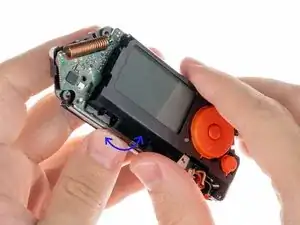
    • Pour détacher le support de la batterie, faites-le légèrement basculer d’avant en arrière tout en séparant les deux pièces.

    • Assurez-vous d’exercer une pression légère et constante pour éviter d’endommager l’appareil.

  9. Gu4OZdoJ4un5UBYt
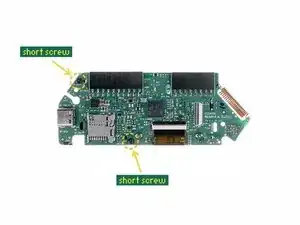
    • Dévissez les deux courtes vis qui maintiennent le support des boutons avec un tournevis PH0.

  10. v2GimfM3g6n6KInX
    v2GimfM3g6n6KInX
    qMWTZNOPelMoEVPB
    RH2WZK311BhIQVQa
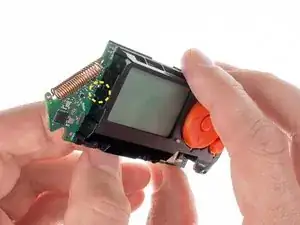
    • Pour séparer le support des boutons de la carte électronique, appuyez sur l’attache sur le côté, illustré ci-dessous, puis éloignez le support de la carte.

  11. qgofbwPUDDeW32i5
    qgofbwPUDDeW32i5
    2ESWpBjrtbRPBmgr
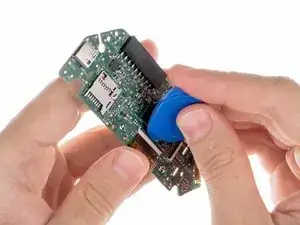
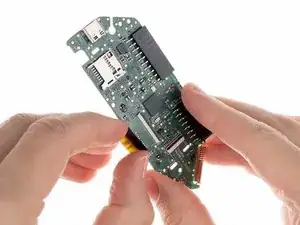
    • Débranchez la nappe de l’écran de la carte électronique. Utilisez un médiator en plastique pour soulever le clapet de verrouillage puis tirez délicatement la nappe hors du connecteur.

    If the screen is broken, but the backlight is still functional, you can carefully peel the screen away from the backlight and reuse the backlight. This also removes the requirement to desolder/solder the backlight. Be sure to use gloves or a soft plastic tool (credit card, spludger, etc) as the adhesive will pick up dirt which will be visible after the repair.

    If your backlight is still functional (glows orange) but you have no images/text on the screen, you can likely re-use the backlight.

    Frosty -

  12. dMlFoEuqWpRRqYKa
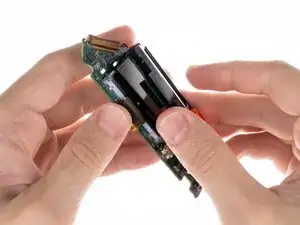
    • Pour retirer l’écran, vous aurez besoin de dessouder deux contacts.

    • Consultez ce tutoriel sur la manière de souder et de dessouder des connexions.

    Those little legs/contacts go to the PCB of the backlight LEDs and are really fragile. I broke one and it's not easy to fix. Be careful!

    Facu -

    BEWARE DESOLDERING!!! I just followed this guide -- I purchased a screen replacement through AliExpress and have concluded that this step is INCORRECT. You are not Desoldering the screen, you are desoldering the backlight!!! If you just need to replace the screen (why you're here on this page probably), you can remove the existing one by carefully using a pry-pick to pull it off the adhesive connecting it to the backlight, then simply replace it with the new screen and reconnect the ribbon cable, all that jazz. That is way easier! Desoldering is completely unnecessary, and puts people at a higher risk of ruining their Flipper for no reason. Please update the guide!

    Brando Calrissian -

    That is, if your backlight is broken. Refer to the comment on step 11

    Tiger -

    While it's technically possible to separate the LCD layer from the backlight and connect a new display in that manner, the original replacement typically includes the backlight already assembled. Therefore, removing the old backlight is necessary when installing the new display.

    Sebastian -

Conclusion

Pour remonter votre appareil, suivez ces instructions dans l’ordre inverse.

Amener votre e-déchet à un recycleur certifié R2 ou e-Stewards.

Sebastian

Membre depuis le 19/08/18

27167 Réputation

12 commentaires

Everything worked fine following this guide. Thank you for the help. In my case was just the glass that was broken, so at the end, i didnt needed to desolder. Just removed the glass with the Plastic pick and worked perfectly. Thank you again for the help.

arthureldo -

Where did you find a replacement glass?

Ben Durrant -

The company behind FZ is not selling screen replacement (they promise they will do it in the future) but for now... So i don't what to think about this guide

Gusbill -

Where can you get an LCD replacement (backlit)?

David Williams -

Checked with Flipper Zero Support and they said there's no replacement screens available. Found one on AliExpress and ordered it so I'll post here in about a month once the display has arrived and I have time to try the replacement, then report back and link the part if successful.

Cody Ouellette -

Did you get a chance to attempt the replacement?

joehannsenn -

I'm going to try and replace the display and keep the original backlight. I'm seeing a lot of reviews saying that the display just needs to come away from the backlight and that desoldering isnt required, but I can't tell where the backlight ends and the display begins. any advice?

Noah -

How did that go ?

John Tracey -

Got a replacement display from AliExpress and it works just as it should and only 20$.

Aiden Hughes -

I was able to find and order a replacement screen from AliExpress. I would have thought by now flipper would have a replacement parts section on the official website. It only took about 2 weeks for the screen to arrive and hopefully I can get to changing it out sometime soon. I’ll post with success or tragedy update.

Brandon Agnew -

Disappointing. Doesn't even show how to remove and replace the display.

joehannsenn -

AliExpress selling fake lcd screen - it will not work. i did already, look how look like your genuine screen compare with AliExpress - you will see it total different. most painful as it china behind - no reply, so hard to return, if you do return it will take 2 month track to see as china never collected parcel from post office, i have ban AliExpress wont buy never

oleg birfon -