Introduction
Outils

-
-
Maintenez le loquet release vers le haut et soulevez la batterie pour la retirer.
-
Une fois la batterie retirée, appuyez sur le bouton alimentation pendant 30-60s afin de décharger tout courant résiduel dans l’ordinateur.
-
Équipez-vous d’un bracelet antistatique, assurez-vous que le cercle métallique touche votre peau. Retirez la pince crocodile de l’autre extrémité du bracelet et branchez la prise jack dans la prise du bracelet, puis clipper la pince crocodile à une masse métallique. Ne passez pas l’étape suivante tant que vous n’êtes pas reliés à la terre.
-
-
-
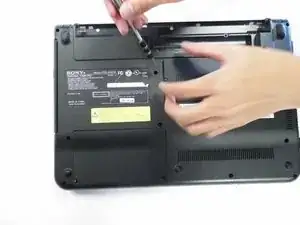
Utilisez un tournevis cruciforme n° 1 pour dévisser la vis de 6,5 mm qui maintient le cache.
-
-
-
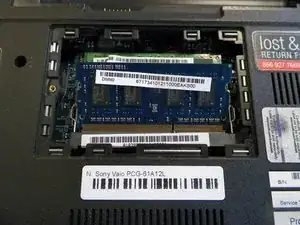
Écarter les languettes de chaque côté de la RAM qui la maintiennent en place. Puis retirez la RAM.
-



Pour remonter votre appareil, suivez ces instructions dans l’ordre inverse.
2 commentaires
This is exact model for my sony vaio. I upgraded ram from 4gb to 2× 4gb sticks (8gb). I was told by electronic store agent to use a faster stick (12800) instead of OEM (10600). Now laptop will not completely stay turned on, even when I go back to just the original 4gb OEM stick in original slot. Any help?
It is possible that you shorted out your computer. This tutorial does not explain the importance of removing the battery from the computer AND discharging the remaining power inside of the computer by holding the power button for 30-60s and most importantly, making sure you are wearing an ESD bracelet to a grounded connection. Static electricity most likely shorted the board. I would bring it to a professional.