
Introduction
Détails du retrait de la batterie du Chromebook Flip C100P d'Asus


-
-
Dévissez les huit vis du couvercle inférieur (l'une d'elles sous la main) à l'aide d'un tournevis avec une pointe J1000.
-
Dévissez la vis du milieu à l'aide d'un tournevis avec une pointe T5.
-
-
-
Utilisez l'outil d'ouverture en plastique pour retirer les quatre pieds arrière en caoutchouc.
-
-
-
Dévissez les 2 vis de la batterie à l'aide d'un tournevis avec une pointe J00.
-
Dévissez la 1 vis de la batterie à l'aide d'un tournevis avec une pointe J00.
-


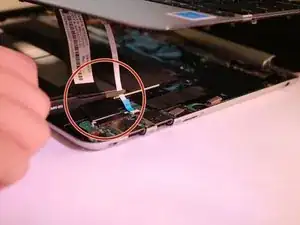

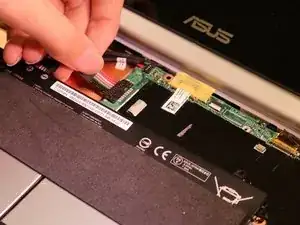
Pour remonter votre appareil, suivez ces instructions dans l'ordre inverse.
2 commentaires
The difficulty rating should be higher. The sound card does not need to be removed, but this is not mentioned. I only noticed it from the next picture. Reattaching the keyboard cable is very difficult; a hint with tips would help.
I had to searched high and low for this but I'm glad I found this site. Thanks for a great how-to, well done. I wish other sites were a clear and concise.
For me, in this step, all the screws were T5.
Jorge Gomes -
Same for me!
David Lipson -
same for me. there are no J1000 screws in this device involved in this repair.
Fabian Aldo Santiago -
also, despite the size discrepency of this instruction’s step, the top middle screw is still a different size so keep track of them.
Fabian Aldo Santiago -