Introduction

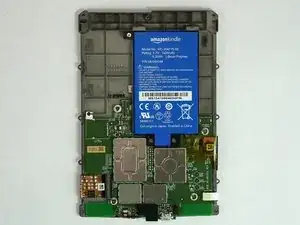
Le Kindle Paperwhite 3e génération (7e génération de Kindles) d'Amazon possède une batterie au lithium-polymère de 3,7 volts (numéro de modèle : MC-354775-05). Ce guide requiert que la Kindle soit éteinte et qu'un outil d'ouverture en plastique et un tournevis PH000 soient utilisés.

  1. mgFAVxtMlxIQ4UXM
    mgFAVxtMlxIQ4UXM
    ruqm6aaQeXEtg61H
    ZtSyLsMBHoJtCOq5
    • Assurez-vous que l'appareil est éteint avant de commencer.

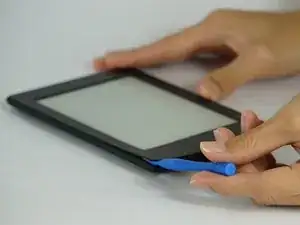
    • Retirer délicatement le cadre de l'écran à l'aide d'un outil d'ouverture en plastique. Commencez par les coins et passez autour des bords jusqu'à ce que vous reveniez à votre point de départ.

    • Soyez prudent si vous utilisez un outil en métal, car il peut rayer la surface du Kindle.

    Be very careful along the lower left side, where the cable to the touchscreen can be easily cut with a plastic spudger.

    John Kenny -

    Be careful at the top of the 3G version. The wifi and cell antennas are located along here.

    James Sullivan -

    I can’t get my spudger in to start lifting. Any advice?

    Davey -

    it takes a bit of force to first insert the spudger into the crack

    jookieapc -

    Be careful inserting the spudger too quickly. The glue holding the screen pulled loose in two spots along the side before the bezel did and there are lines along the border of my screen now.

    Nick -

    I made my own version of Nick’s error: I inserted a pick too far under the bezel, and very slightly separated the screen, leaving a small shadow in a corner. Easy does it!

    Other than that, battery replacement was super-easy and successful.

    Brad Compton -

    I couldn't get a purchase from the outside, so started from the inside of the bezel. It was secured with double sided tape. Might have been better to apply some heat before prying.

    David Glover -

    Used the guide to replace the battery. Could not get enough separation using the blue spudger. Used the metal spidger to get things started then switched to the blue picks. Afterthought, Warming the bezel would have helped.

    Jeffry Long -

  2. QBrApwutG5skHnuh
    QBrApwutG5skHnuh
    ybLHesScbrlvJNxh
    5fNhbAC6J2KKgWPS
    • Faites preuve d'une extrême prudence lorsque vous soulevez le cadre. Veillez à ce que votre outil ne tombe pas sous l'écran. Regardez sous le calque pendant que vous travaillez, en séparant l'écran de l'adhésif du cadre.

    • Vous devez vous assurer que votre séparateur passe à travers les deux côtés du cadre, au-dessus de l'écran.

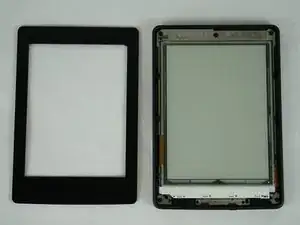
    • La deuxième photo est le calque que vous voulez que votre outil traverse en toute sécurité.

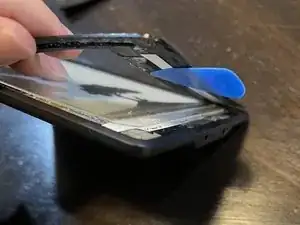
    • La troisième photo est un exemple de ce qui peut se passer. Dans ce cas, la couche de digitalisation ne lira pas correctement les touches et l'écran sera endommagé de manière permanente.

    Scheiß Anleitung. Das Glas muss man nicht lösen um den Akku zu wechseln.

    Christoph B. -

  3. MbWZKSBHjy5mrCMG
    MbWZKSBHjy5mrCMG
    ST1NGusypgqBckxL
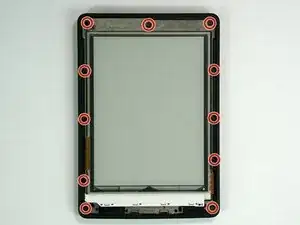
    • Dévisser les onze vis Phillips #000 de 3,2 mm entourant le cadre.

    I have a 3rd Gen Paperwhite and there are only 10 screws. 5 along each side

    jookieapc -

    Mine had 11, as per the instructions, one of which was hidden under tape. I cut an opening in it.

    David Glover -

    Should have read Glover's comment.

    Looked for the middle screw but the black tape covered all appearances of it. Lifting the mid-frame out of the case snapped the mount. However, there was plenty of support with the ten screws and no lasting damage to the reader.

    Jeffry Long -

  4. tXbdeuCkakiQOUZC
    • Soulever délicatement le cadre central hors du châssis avec vos mains.

    • Soulever d'abord le côté opposé au bouton d'alimentation.

    I had trouble removing it. It was stuck and I managed only to free it with force. Now I have to fix the button..

    LGenie -

  5. qp3NYCcJFisoelfD
    qp3NYCcJFisoelfD
    STsGkWp46qJkgbPj
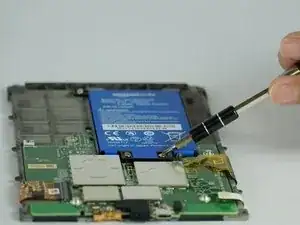
    • Dévisser les trois vis Phillips #000 de 3,0 mm qui fixent la batterie.

  6. WdpZapnw22YZYyQl
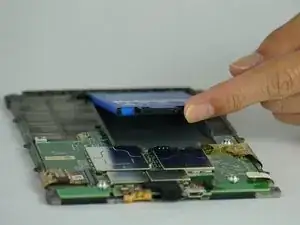
    • Soulever délicatement la batterie du châssis.

    We had a Kindle that unfortunately took a dunk in (clean) water. It was then inoperative. I followed this guide, and took the battery out, let everything dry for a few days, then replaced the battery. Now it works fine! Thanks!

    Frank Demarest -

Conclusion

Pour remonter votre appareil, suivez ces instructions dans le sens inverse.

Micah Smart

Membre depuis le 10/02/16

3238 Réputation

20 commentaires

Same for 5th Generation ??

PAUL FRIEND -

where can i buy a new battery ?

david horn -

you need a taobao.

lol

kassadin -

They are sold on aliexpress and ebay but the price of battery and postage is not that different from the price of a second hand 3ed Gen Kindle. But then the second hand Kindle will probably need a new battery too so, I am going to get a battery from ebay.

Timothy Takemoto -

where can I buy a replacement battery?

boelens -

If the charging light does not turn on (at all, no colour) - does it make sense for me to try a new battery?

Artūrs Lataks -

Yes unless you want to buy a new Kindle. Batteries (MC-354775-05) run under 20 from various sites.

DDD -

I used this guide to replace the battery in my Kindle which I bought in 2016 - the battery was down to only holding charge for a few hours. My kindle usage is heavy though - especially while sitting out 12 weeks of redundancy with nothing to do - it was a real sanity saver.

I bought the replacement marked as 58-000049 compatible - which it was

Thank you

jacqui_scarff -

How can I tell which generation my Kindle Paperwhite is?

pbr -

when removing the frame, the edges of the display have unfortunately lifted off a bit, respectively there are now some slight scratches at the corners of the display, as if the foil was off there.

Is there anything I can do about it? Thanks in advance

bastimm -

Thank you for this! Just did it myself. The only thing I would add to this guide is that you may need to replace the adhesive for the bezel — the corner that I initially peeled off had some trouble staying down after I replaced it.

Matthew Fox -

Worked almost fine for me! Found replacement battery on ebay with original model number.

The only point I somehow struggled with is the fact that there is no option to shut down the paperwhite. The only options my device provide are reboot and display off (and cancel of course). However, I selected reboot, lowered 2 screws from the battery and before booting up again I removed the last screw and replaced the battery.

Groej Htro -

This worked fine for me battery is great only problem is that the backlight (actually front light at bottom of display) no longer work!1

David Binder -

That worked well. Thank you.

judithmatz -

Go easier on the spudger than I did. Go in too far, and you can separate the screen, causing a permanent issue. Any tape from under the bezel that tears needs to be replaced as best you can as its absence will cause light to show through the bezel in that spot when you reassemble anything.

shf781 -

Available for Kindle 8th generation.

cssuntherrao -

Thank you, that middle screw at the very top was hidden behind the adhesive on mine so I would have missed it if it wasn't for the guide. Also wanted to mention that there is a couple of clips holding the mid frame so I had to gently pry it away with my plastic opening tool. Other than that, no issues!

Chris Horry -

Hi when I attempted to remove the bezel, it looks like the top layer of the screen came with it there are weird wavy lines on the screen. It appears the top layer of the screen separated and now won't meld properly with the underlayer. has anyone had this problem and can it be fixed without replacing the screen?

Lauren Carroll -

更换完后需要恢复出厂设置吗?会不会存在系统无法识别新电池容量的情况?

Jobs Tri -