Introduction

Ce tutoriel est important car il est nécessaire pour accéder à certains composants de la carte qui peuvent avoir besoin d'être changés.

  1. AQtIBB1ZGqHTvNg4
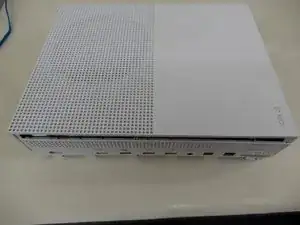
    • Retournez la Xbox One S pour que le dessous soit au-dessus.

  2. cI432T5plYCpwsEg
    • Commencez par travailler sur l'arrière du boîtier, là où est situé le sticker de garantie. Insérez un outil d'ouverture en plastique dans l'espace entre le bas du boîtier et le côté supérieur avec la grille. Puis trouvez les clips entre les deux qui maintiennent le boîtier en place.

    • Avec l'outil d'ouverture en plastique, désenclenchez les clips. La meilleure méthode est de faire levier sur le boîtier noir, vers le haut.

    • Vous entendrez des clics à mesure que vous ouvrirez le boîtier. Il peut être assez ardu de retirer la partie basse du boîtier.

    • Il est possible que les clips cassent lorsque vous retirerez la partie inférieur du boîtier.

    • Nous recommandons de commencer par le derrière, à l'endroit du sticker de garantie. Faites levier le long du bord de derrière jusqu'à libérer tous les clips. De là, faites chaque côté. Lorsque 3 côtés sont libres, commencez devant à l'opposé du bouton de synchronisation. Faites attention et prenez votre temps, et tout devrait se séparer sans casse.

    Be careful not to damage the pairing button on this part

    David -

    Important!!

    You've to start from the back corner where is the information label, because there is a main clip behind a warranty sticker

    Cristian Ramirez -

    They should add this to the guide! I didnt know that, and did some minor damage to the bottom piece where that main clip is.

    I dont mind because it's my own Xbox, but what if it belonged to a customer?

    Charles Jackson -

    They should add this to the guide! I didnt know that, and did some minor damage to the bottom piece where that main clip is.

    I dont mind because it's my own Xbox, but what if it belonged to a customer?

    💯% same opinion!

    profnussecke42o -

    This was hard! I tried using plastic pry tools, but they did not work. A metal tool did, but make sure to watch a video or two, to see what you actually are dealing with. After the videos it went quite smoothly.

    Peterdk -

    I legitimately cannot open the case where the warranty sticker is, ive tried everything, im resorting to a fork to try and open this

    Sohail ツShah -

    nothing is moving... not sure what I am doing wrong but I can't feel any clips anywhere. I'm genuinely scared to break something.

    bumpsy -

    undid all the clips on the back and nothing moves more than a few millimeters... is there actually a good guide out there that doesn't promote breaking plastic?

    bumpsy -

  3. DGFtVxEdoZKRdLMd
    • Une fois que tous les clips sont ouverts, enlevez la partie inférieure du boîtier.

  4. GeIOPswgPOYsuGeJ
    GeIOPswgPOYsuGeJ
    uITOYPJDbxUgf4Lc
    • Avec un tournevis Torx T10, retirez les six vis vertes de 50 mm de long du boîtier métallique, numérotées de F1 à F6.

    My F3 isn't coming out. The screwdriver isn't sitting tight like it is for the other ones. Any idea on how to fix that?

    ben mccord -

  5. 3AbSAfsoTxUrMeTi
    3AbSAfsoTxUrMeTi
    wudY36aHJeyT6WjV
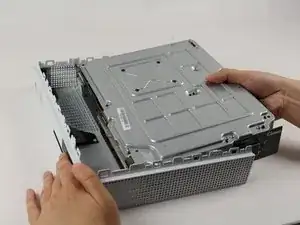
    • Séparez doucement le boîtier intérieur du boîtier blanc en utilisant la méthode appropriée.

    • Soulevez les côtés en plastique blanc à l'arrière en les écartant vers l'extérieur afin de les détacher du blindage E/S en plastique.

    Essential tip: be sure to slide the metal housing backward, away from the from of the case as pictured above, rather than upward. If not, you can easily break off the teeny momentary switches on the IR blaster board!

    Mark Ross -

    “appropriate method is not descriptive like Mr. Ross’s comment. The original poster should edit the description to ensure people do in fact remove the box from the case appropriately. I would also add arrows to the picture.

    Ryan A -

    ____________⬆️

    ↖️Yes! I see it the same way!↗️

    ⬅️Arrows are always a good thing!➡️

    ↙️Can't do anything wrong with them! ↘️

    ____________⬇️

    😅😅

    profnussecke42o -

    I didn't realize that metal ribbon was connecting the case to the console and I yanked it w out realizing it was there. How o I get a replacement?

    Jerianna Mike -

  6. EFLSsRhhXsAEZnYh
    EFLSsRhhXsAEZnYh
    OjVWJsD26pdrus24
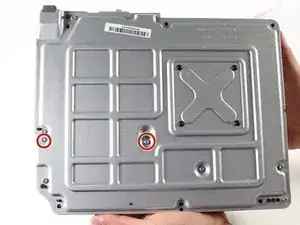
    • Pour remplacer le disque dur, retournez la console et retirez les deux vis torx T10 de 10 mm, numérotées C3 et C4, depuis l'arrière de la Xbox One S.

    • Certains modèles requièrent éventuellement le C4 et C5.

    • Cette opération va détacher le boîtier plastique qui entoure le disque dur du reste de la console.

    Some of my silver were gold screws, so just letting people know to look out for that!

    jovialkitten -

    The Torx screw circled on the left is actually C5

    Jaryn Wickman -

    I found the same. On my Xbox One S, it's C3 and C5 that hold in the hard drive caddy. C4 holds in the optical disk caddy.

    jamesr -

    Yeah, C3 and C5 on my console too.

    Jahn Roux -

    Funny thing on my console rev t t3 built feb 2018 it’s C4 and C5

    KingofRome -

    The instructions fail to mention that the top metal cover can be lifted off at this point without undoing any more screws.

    CityZ -

  7. X2IJJg3NqtsnAcbY
    X2IJJg3NqtsnAcbY
    NAHJXCj1SgvQNjOx
    3fEHBmUuTGRL3omb
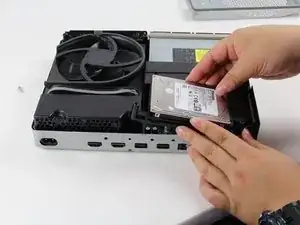
    • Déconnectez doucement le disque dur de la carte mère au niveau des deux connecteurs en plastique.

    Do not disconnect the connector in the second image! There are tiny prongs that bend easily and if bent just a tad bit they will break off. I had first hand experience with this and I ended up breaking my Xbox because I could not put that cable back on.

    [deleted] -

    Do not remove the cable!!!! You can change while the cables are plugged. It took 2 hours trying to put mm precisely all the little pins because of the removal of the cables.

    Please update the post, I could easily end up as the Aaron, breaking the XBOX completly.

    Botond Kopacz -

    Yes, this has also happened to me the connectors had broken and the pins bent and snapped off.

    Samuel Garbutt -

  8. VxZkFMZbQAxM2dKL
    • Pour retirer le lecteur de disque optique, retirez la vis Torx T-10 argentée de 10 mm étiquetée « C4 ».

    The image shows screw 'C4' witch is the correct screw. 'C5' is for the HDD.

    GoJoel -

  9. IL5gf22gGXMcJsTw
    • Retirez légèrement le disque de la carte mère et débranchez les connecteurs en plastique de la carte mère.

  10. LDNGpA5mc6kvJlfK
    • Pour remplacer la carte mère, vous devez retirer les trois vis Torx T-10 argentées de 10 mm étiquetées « C1 », « C2 » et « C6 ».

    • Retirez les quatre vis Torx T-8 noires de 8 mm étiquetées « A1 », « A2 », « A3 » et « A4 ».

    The Black screws are T-8 Torx, not T-9!

    Jakub Krzyskow -

    I didnt see this before, so thankfully I was able to use T9 without stripping the screws!

    Charles Jackson -

    IMPORTANT! You also need to remove the two T10 screws labeled B1 and B2 in order to remove the motherboard! I had to figure this out on my own.

    Charles Jackson -

    I hust had to remove the red ones and than i was able to lift the powersupply of the mainboard

    Dennis M -

    I had to remove B1 and B2 as well.

    Seen Bee -

  11. VYVC1GvNKhPpRiky
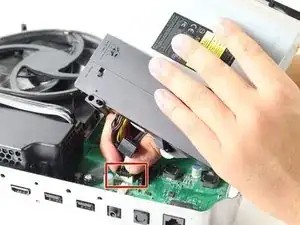
    • Placez la pince rectangulaire argentée sur le coin opposé du bloc d'alimentation.

    • Retirez le cache noir situé près du ventilateur.

    Remember to remove the black bracket by the fan!

    Martin Samuelsson -

  12. HTtOORoftr1aaQ2q
    • Saisissez la bride à l'aide de la pincette. Tirez la pince vers le haut, en l'éloignant du boîtier argenté. Agitez-la d'avant en arrière comme une dent si nécessaire.

    • Il n'y a pas de mal à exercer un peu de force pour détacher la pince du boîtier métallique argenté. Le métal est pliable et peut être replié/raccroché.

  13. vHit45sPMfFVLkIo
    • Retirez les quatre vis Torx T-9 noires de 8 mm marquées « E1 », « E2 », « E3 » et « E4 ».

  14. HkRCjZl1Gmbk6Z3D
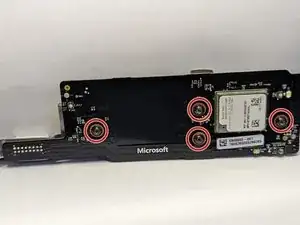
    • Retirez les trois vis Torx noires de 8 mm marquées « D1 », « D2 » et « D3 » pour retirer la carte Mediatek.

    What bit couldninuse tontake D1-3 screws off

    Amanda Zapata -

  15. agFplIWSUCuRiA26
    • Maintenant que le bridage est retiré, soulevez délicatement la carte mère par ses bords pour la dégager du boîtier métallique. La carte mère devrait sortir facilement.

    How do you open it?

    johnluxford07@gmail.com -

    They forget, I think, to tell that first you need to take off screw B1 and B2

    Gabriel Varela -

Conclusion

Pour remonter votre appareil, suivez ces instructions en sens inverse.

Erik Ramazzini

Membre depuis le 26/04/17

2881 Réputation

10 commentaires

This guide is really missing alot between steps 13 and 14. There are two black panels that have to be removed(they’re in the teardown guide). One is on the front with with screws E1 ,E2, E3, E4. And theres another panel on the side with screws D1, D2, D3. Finally there are two more screws on the bottom that hold down the motherboard B1, and B2. Theres Also a black from in between the Fan and case that slides off too.

Nathan Stanley -

Yep, I was using this guide and realized that it is missing a few vital steps. Thank you Nathan.

Dave Miller -

If you have a multimeter could you please test the test points around the board and give me a list of a voltages?

Lilithe Lotor -

fantastic! only issues that are missing, are mentioned in the comments above. I´d like to include that most of the exterior hardcase clips are made to be HELD in place. Which is why it´s a nuisanse to remove. So, newcomers be careful with it. otherwise you´ll easily break it.

Mateus Cesar Loubach -

Son los mejores

NELSON ESTREMERA -

My xbox one s turns on, fan runs but no signal nor will not connect to controller.

I do have a faint burnt smell, any idea what could be at fault?

jaboody singh -

a 5 min job ???????? LOL

Alan Sears -

How do you remove the old heat sink from the motherboard?

Seen Bee -

How do u remove the fan?

Marco -

My father had bought me the new motherboard and in china region locked, this is not ok, you should test your reused products before selling them

L D -