Introduction

Bonjour !


Ce tutoriel va vous expliquer comment remplacer la carte électronique du lecteur optique de votre Xbox One.

  1. xruA2bUGMuUupq2b
    xruA2bUGMuUupq2b
    urCBAOcV216t4qDY
    niXqAdGU1SWnnEWc
    • Pour commencer, retirez la bande en aluminium qui est collée sur l'arrière du lecteur optique, cela vous donne accès à deux autres vis.

  2. 5WHJgPrf4TyGyfWF
    5WHJgPrf4TyGyfWF
    eNhFw2VgyFH43nMQ
    W2PSYwxFSUuB1yAb
    • Dévissez les 4 vis cruciformes PH1.

    • Retirez ensuite la plaque métallique. Normalement cela ne demande pas de forcer, et la plaque se déboîte facilement.

  3. 2JwVvvwO6UBK6F2w
    2JwVvvwO6UBK6F2w
    EUvltLSdsUHDsG3G
    pgG3JCddPikselmA
    • Ne retirez pas les nappes en tirant directement dessus ! Déboîtez d'abord les connecteurs ZIF (petite pièce noire qui retient le connecteur) en les inclinant vers le haut. Sinon vous risquez d'endommager le connecteur.

    • Ouvrez les 3 connecteurs ZIF prudemment avec le bout de vos doigts ou avec un outil pour ouvrir en plastique.

    • Retirez les 3 nappes de leurs connecteurs.

  4. jOYlNypWcos4Zhix
    jOYlNypWcos4Zhix
    wPJ62F4TTaMmcQCU
    pUEdL2xLyD4J2tLe
    • Vous allez voir un câble noir et un câble rouge soudé au PCB

    • Préparez votre fer à souder et dessoudez ces deux câbles. Chauffez l'étain avec le fer et retirez soigneusement le câble une fois qu'il est fondu.

    • Il est recommandé d'utiliser une tresse à dessouder (soldering wick en anglais), ce qui permet de remplacer l'ancienne soudure par une nouvelle. Mais ce n'est pas obligatoire.

    • Une fois que l'opération est faite, le résultat devrait ressembler à la dernière photo.

    You can also slide the drive out of the bottom half of the metal case and then unscrew the motor and bring it with the PCB to the new drive (assuming the motor is good).

    Andy Reddin -

    That is correct! You can transfer the motor to the new drive if the motor is OK. I created this guide if you need to replace the motherboard. But yes this is an option if you replace the drive only :).

    koppie007 -

  5. nEv1OELYtKIdkl3X
    • Dévissez les 3 vis cruciforme PH1.

  6. ZOyLhsa4u5k4CKuF
    ZOyLhsa4u5k4CKuF
    M6RZNtctaAoJQrSD
    rhDARosVS6RQAOZf
    • Retirez délicatement le PCB (ou carte électronique) du lecteur. Pour cela, soulevez-le légèrement en le tirant vers vous. Cela peut demander de forcer un peu, surtout pour la partie de droite, qui est retenue par un clip.

    • Après cela, le PCB devrait se retirer facilement.

    • C'est bon ! Vous avez à présent récupéré le PCB du lecteur optique !

  7. hqwl4iptmUpfMxLA
    hqwl4iptmUpfMxLA
    c6Yyx5K3JdHT1Xnc
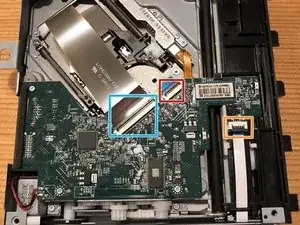
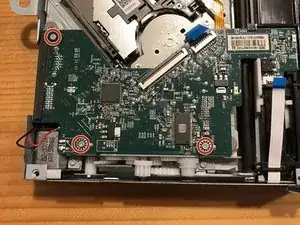
    • Lorsque vous installez le nouveau PCB, faites attention aux endroits montrés sur la Photo 1 (cercles rouge). Le photo 1 indique ce qu'il ne faut pas faire !

    • La Photo 2, elle montre la position que doit occuper le nouveau PCB dans le lecteur optique (voir cercles bleu).

    on my PCB the little arrow is sticking out and not going back in, I'm assuming that it has to do with the eject function. which my Xbox one doesn't do now.

    nick pascullo -

Conclusion

Pour réassembler votre lecteur optique, suivez ces étapes dans le sens inverse.

J'espère que ce tutoriel vous aura aidé !

koppie007

Membre depuis le 22/08/13

22506 Réputation

18 commentaires

I got a refurbished disc drive for Xbox one console and later learned logic board had to be switched. What's that?

jjackparts -

Hi!

Yes, you need to use your old PCB. If you do not transfer your (original) PCB from your drive, you’ll not be able to play games..

koppie007 -

PS: Merry Xmas everyone!

koppie007 -

I also did not know you needed to replace the PCB with the optical drive. However, the new one will not even suck in a disc, just like the old one did not. Does this mean the new drive is bad as well, or just needs PCB? Would not replacing PCB make the thing not even receive a disc?

ndwig -

Hi there!

You are required to swap the PCB to play games. With an non-married PCB to your current motherboard, should still accept discs! You’ll be able to watch movies only. Are you sure that everything is dust free? Perhaps you got another faulty drive… The issue you describe is common.

koppie007 -

I just did this with a new disc drive and it still will not read discs. It sucks the disc in and will eject but will not read discs. When I insert a disc into the new drive it makes a strange noise like my previous disc drive was doing. Is my new disc drive bad?

Chad B -

Hi Chad!

That is possible yes. Strange noise could refer to the worm motor. Try to trade in the new disc drive and try again!

koppie007 -

Finally found out why my drive was making an ejecting noise on start from these photos.

It was because the white plastic part shown under the red circle was off to the right and wasnt pushing that button/ in.

Craig Donnelly -

Alright! Glad that you were able to fix it :)!

koppie007 -

Let's say I got the PCB out, can I attach to different blue ray drive, from PC or laptop?

Or does it have to specific model. Any mods available?

robert -

No, it needs to be the specific blu-ray drive. If it's the exact same model as from the Xbox one, you can swap it. Not sure if there are any mods available.

koppie007 -

i broke the zif clip, black piece, on the smallest ribbon, can i get a new zif connector and put it on the PCB ribbon connector? if so any ideas on where i can get a zif connector from?

greg Knight -

Hi Greg! Yes you can. Here you can buy a lot of different ZIF connectors: https://www.csconn.com/products.aspx

Please make sure that you have the right one. It's not easy to replace it as you need to solder to get it fixed.

koppie007 -

Thank You!!!!!!!!!

greg Knight -

I am replacing my disk drive, is this the only part I need to transfer or are other parts paired to my motherboard? T.

Theo -

Basically yes. All the other parts should be in the drive already :).

koppie007 -

So what errors do you see if you use the wrong board? Will games not install? Will Blu ray still play? Would it not do anything? I recently swapped out a disc drive and I'm 90 percent sure I used the right disc drive board but it won't install any games. Just don't want to tear it all apart for that not to be the case.

Andrew gamble -

So, the error you get is basically that it won't install nor detect a game. It should still play DVD (or Blu-Ray) movies. It could be that your new drive is faulty... Please check if you hear any weird sounds or anything.

koppie007 -