Introduction
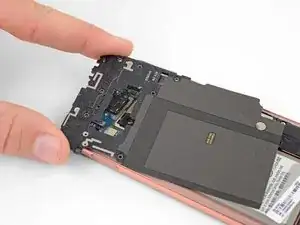
Tutoriel pré-requis seulement pour retirer le châssis central du Samsung Galaxy S10e. La bobine de recharge sans fil et la bobine NFC sont incluses toutes deux dans le châssis.


-
-
Faites glisser un médiator sous le coin inférieur droit du châssis supérieur pour faire céder l'adhésif qui le fixe au châssis inférieur.
-
-
-
Insérez la pointe d'une spatule (spudger) dans la petite encoche du côté droit de la partie en plastique du châssis supérieur, à côté du bouton Bixby.
-
Faites levier avec la pointe de la spatule pour séparer le châssis central du châssis du téléphone.
-


Pour remonter votre appareil, suivez ces instructions en sens inverse.
Déposez vos déchets électroniques dans un centre de recyclage certifié R2 ou e-Stewards.
La réparation ne s’est pas déroulée comme prévu ? Consultez notre Forum pour obtenir de l’aide au diagnostic.

Again, criminal lies! These screws have different length! Take notes which are where! There are at least 4 versions of antenna/coil modules, so each time it may be a little different.
Someone fromjapan -
Interesting observation! I did not see this comment until after I reassembled the midframe and closed everything, so I can not confirm. If true, I either got lucky or it didn't matter.
WL1 -
I'll note this and see about maintaining the same order for reinstallation -
Gee Foe -
Mine appeared to be all identical, so it was easy
Gee Foe -
The screws on my SM-G970F/DS were all identical.
James Beegle -
The screws in my phone were also identical. I think the "criminal lies" commenter above was confused and was using these instructions to repair a different phone. Too many of his or her comments are just not relevant to this job.
MikeT-NYC -