Introduction

Remplacement du clavier pour les Toshiba Satellite C660 - Tutoriel vidéo :

Vidéo

  1. VXFRBbTQHDFvKXXQ
    VXFRBbTQHDFvKXXQ
    PWGj3jgXXiUkmupR
    • Débranchez la prise secteur et retirez la batterie.

  2. IOrJuTINXcICZNmZ
    IOrJuTINXcICZNmZ
    eREgeHSljwtBvEgs
    XRejRuR5BJNbrVCD
    • Après avoir enlevé l'étroit couvercle en plastique, vous verrez 4 vis cruciformes.

  3. JXEcAuWElA1FUGLU
    JXEcAuWElA1FUGLU
    3gOGRYXDIKVFEuwy
    IliQJYXbGm1LJ1EE
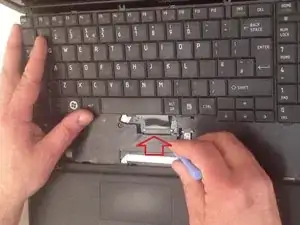
    • Soulevez le clavier et débranchez la nappe flex.

  4. cRy33r5n6AUF2CNX
    cRy33r5n6AUF2CNX
    KPAGLnwtO1PJoKHc
    sNJXlodSn2m1AV3T
    • Maintenant, connectez le nouveau clavier. C'était très facile.

Conclusion

Pour remonter votre appareil, suivez ces instructions dans l'ordre inverse.

ZFix

Membre depuis le 09/12/13

193429 Réputation

5 commentaires

Hi there, Thank you very much.. please help me .. i broke that white plastic draw beneath the keyboard cable while was pushing it away to take the cable off .. what to do please?

Reef -

You can put a piece of plaster tape to attach the tablecloth with the plug. Take a piece of chatertone (electric tape) to avoid short circuiting.

Hyperion -

Hi there, Thank you very much

Abdelhamid Fathy Amer -

Great stuff, I actually fixed my ancient and loved laptop, why is it loved? I hate Win 10 and have a new ASUS which is ace and super fast, but it is still Win 10 that I cannot get to grips with, but cannot restore the ASUS with Win 7. Thanks very much indeed

Don UK -

I notice these instructions don't require removing HD & memory, which would seem to confirm it's not necessary to do so for a Toshiba Satelite L300, which is virtually the same as a C660 apart from not having a separate number pad.

Incidentally these instructions can also be for replacing a C650 keyboard as I have just done so successfuly thanks for the very clear instructions, so full marks!

John Smith -