Introduction
Si vous avez des touches qui collent ou qui ne répondent pas, il se peut que vous ayez besoin d'un nouveau clavier. Ce guide vous montre comment remplacer le clavier de votre ordinateur portable.


-
-
Retournez votre ordinateur portable de manière à ce que la partie arrière soit orientée vers le haut.
-
Retirez le panneau de la mémoire en enlevant les deux vis noires de 5 mm à l'aide d'un tournevis Phillips #0.
-
Retirer le panneau de la mémoire.
-
-
-
Retirez les deux vis de 5 mm à l'aide du tournevis Phillips #0.
-
Retournez l'ordinateur portable et ouvrez-le.
-
-
-
Appuyez doucement sur le clavier et faites-le glisser vers l'écran. La partie inférieure du clavier sera ainsi s'extraite du boîtier.
-
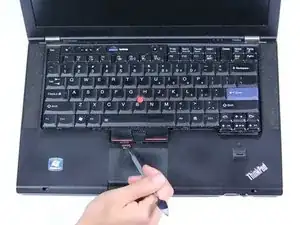
A l'aide d'un spudger métallique, soulevez et faites glisser le clavier pour le sortir.
-
-
-
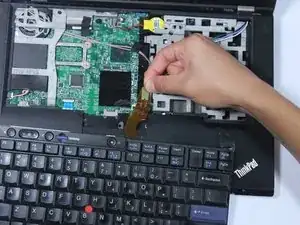
Retirez le câble orange en soulevant la languette située à l'extrémité de la connexion ruban.
-


Pour remonter votre appareil, suivez ces instructions dans l'ordre inverse.

6 commentaires
This is not the Lenovo Thinkpad T420. You can Tell by the RAM memory Slot Cover and the Position the RAM is put into its slot. the T420 RAM is Vertical Compared with being Horizontal in this Picture. that includes the cover also. Then the Battery Slot is a Dead Giveaway clue. The T420 Battery slot is in the middle. and this Picture has the battery slot to bthe left. Sorry Not Even Close. None of the screws he removes are on the T420. so this is Completely Useless. Thanks
The steps are almost exactly the same though - I've performed them on my own T420. This guide is for the T420s. Just remove the memory panel with the single screw on the base of the laptop, remove the screw with the keyboard emblem next to it, and follow the keyboard removal steps in this guide.
you do know this guide was made for the T420s? it literally says so on the guide. take a moment to read my friend.
I just did this, in combination with this: https://support.lenovo.com/us/en/solutio...
Was pretty easy and working great. I am bit intimidated opening up a laptop or PC, but the “Easy” rating on this gave me the idea to try. Glad I did.
Thanks for your post Jay, the link was not valid any more but i went on that site and looked for the correct Maintenance Manual which helped me complement this guide while changing my keyboard. Here everyone with Lenovos can get this kind of Manuals which are official, very complete, and explanatory with good graphics of the procedures and parts: https://download.lenovo.com/eol/index.ht...
Javier -
I have disassemble and assembled all the keys on the keyboard but I’m having trouble assembling the muse buttons, can anybody help me
Vegard -