
Introduction
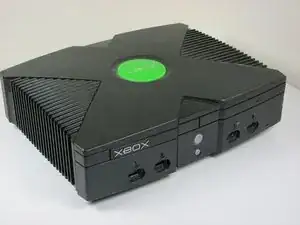
Utilisez ce guide pour remplacer le lecteur de disque dans une Microsoft Xbox.


-
-
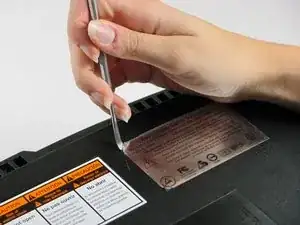
Vous pouvez soit enlever les étiquettes ou simplement rechercher les trous de vis à travers les étiquettes et ensuite couper ou percer un trou à travers elles.
-
-
-
Une fois que les coques inférieure et supérieure ne sont plus attachées, tournez délicatement la Xbox, puis soulevez et retirez le capot supérieur.
-
-
-
Libérez le câble d'alimentation du disque dur du support afin de laisser suffisamment de mou pour sortir le disque dur.
-
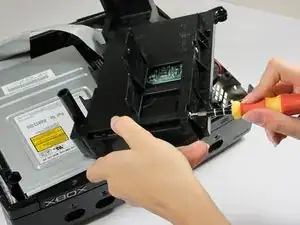
Soulevez le support en plastique du disque dur pour le sortir du boîtier de la Xbox.
-
-
-
Retirez les quatre vis Torx T15 de 3,4 mm du support en plastique du disque dur (deux vis de chaque côté).
-
Retirez délicatement le disque dur du support en plastique. Un basculement doux permettra au disque dur de sortir assez facilement.
-
-
-
Tirez le câble ruban de données du disque dur et le câble d'alimentation à la verticale du disque dur.
-
-
-
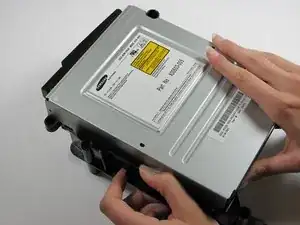
Retirez le lecteur de disque. Il devrait sortir tout de suite.
-
Débranchez le câble ruban et les câbles jaunes à l'arrière du lecteur de disque.
-
-
-
Soulevez les languettes en plastique noir autour du lecteur afin de le retirer de son logement. Une fois retiré, mettez le lecteur de côté.
-
ENLEVER SEULEMENT SI HS!
-





Pour remonter votre appareil, suivez ces instructions dans l’ordre inverse.

8 commentaires
http://www.ebay.com/gds/How-To-Determine...
Utilize the information on this website to determine what Xbox version you have so you know what replacement parts to look for.
The final comment mentions “only remove if dead.” What about a disc drive that closes and opens immediately….in other words, won’t stay closed. Is this a sign of a defective disc drive too?
Miguel -
I am having the same issue, Miguel.
Did you buy a new drive or figure out a better fix?
Thanks
Ben C. -
I learned that you need to change out the drive belt in the disc drive. Over time it wears out and either won't open, stays open, or will open/close continuously. I changed my drive belt and it started working fine.
Can anyone help..My Xbox can't read games..I took it apart and cleaned it, still can't read games
if your having the same problems as me this laser inside could be done for and need a replacement. you could also figure out how to use a multi-meter and read the ohms to see if the laser is getting enough power. but i don't know how todo that and nothing on youtube help. there are so many different drive and most people choose the easier drives/better drives to repair. I would suggest finding what drive you have then after that looking up the drives model and see is there's anything about replacing or adjusting the laser. another solution is you can either buy a whole new xbox that isn't working and take the drive out and see if that works but it or you could just buy a new drive of ebay or any site that may have it. a nice thing about the og xbox is that that disc drive and the motherboard aren't married so you don't need to take that key out and match it with the motherboard.