Introduction

Consultez ce tutoriel pour retirer le module central de votre Samsung Galaxy Watch Active.

  1. RCApCkRPAgtqkLXV
    RCApCkRPAgtqkLXV
    qb4A4EIFaOI2MqEF
    • Éteignez la Galaxy Watch Active en appuyant sur le bouton inférieur et en le maintenant enfoncé pendant environ 3 secondes. Vous devriez ressentir une courte vibration.

    • Lorsque le symbole “Éteindre" apparaît, appuyez au milieu de l'écran pour l'éteindre. Vous devriez ressentir une vibration plus longue en guise de confirmation.

  2. 1Jj2uF5cWgFAtF3r
    • Prenez un tournevis Tri-point Y00 pour dévisser les quatre vis de 4 mm de long qui fixent le fond de la montre.

  3. ksCYS2QHyDkHnEjh
    ksCYS2QHyDkHnEjh
    WWqrWonten1M6re6
    ggRiQmOIcuHNliuZ
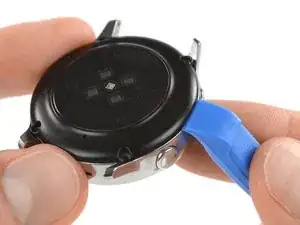
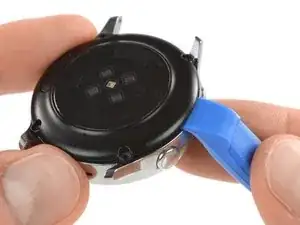
    • Insérez un outil pour ouvrir entre le fond en plastique et le boîtier métallique, du côté des boutons.

    • Enfoncez la partie pointue de l'outil dans l'interstice, afin de séparer le fond du boîtier.

    • Ne retirez pas encore complètement le fond. Une nappe le relie à la carte mère.

    Do i need heat for this? i can't get a pry tool in

    23william90 -

    EDIT: use a Rasor knife in the corner nest to the screw holes and it's a lot easier and less damaging to take off.

    23william90 -

    In my case there was quite a bit of glue on the edge of the back cover, and a knife was indeed the only way to pry it open. No way to get the first gap with a plastic tool.

    Marcus Groeber -

  4. sjEsBcJfgjGXLtui
    sjEsBcJfgjGXLtui
    LMRZBowcgZpA3DqF
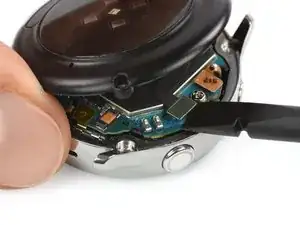
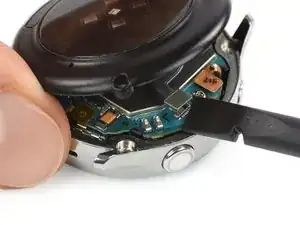
    • Soulevez délicatement le fond d'environ 2 cm, pour accéder au connecteur du module capteurs, à côté des deux boutons.

    • Prenez une spatule (spudger) pour déconnecter le module capteurs de la carte mère.

  5. XQ1qXkBInRiA1uVd
    • Ôtez le fond.

    Thank you very much. Nice job!

    Alvaro Grites -

  6. ZGVLCTNHPt6hHTDA
    ZGVLCTNHPt6hHTDA
    DFpCr3UJjYPTttg4
    sRvQ4XNolKIAmDIM
    • Avec une spatule, débranchez l'écran et le module microphone et capteur de pression.

  7. eZTwOTfsR4XhjwXp
    eZTwOTfsR4XhjwXp
    HqBqNdusil4POwvq
    rCRUeQ1GOQSyiSpj
    • Servez-vous d'un médiator afin de décoller le petit morceau de ruban adhésif qui est relié au module microphone.

    • Lors du remontage, veillez à ce que ce ruban adhésif adhère bien à la carte mère, en appuyant dessus avec le bout plat de votre spatule.

    What can I use if the glue no longer holds?

    Dominik Dittrich -

    Just make sure it lays flat and the counterpart on the back cover (the white thing at the bottom in the image of step 5) will press it down and hold it in place.

    Tobias Isakeit -

    What can I use to make it lay flat?

    Every time I press it down it just pops up again.

    Rosalie E. Morgan -

  8. nRHagQSSQCgBxIWD
    nRHagQSSQCgBxIWD
    mDNoIjCfAtLKprdJ
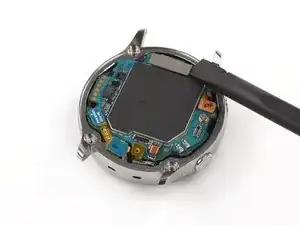
    • Insérez un médiator en bas à droite, entre la carte mère et le châssis. Puis soulevez le module central.

  9. jwwDYN4Kb2xoEwKO
    jwwDYN4Kb2xoEwKO
    mnPNrRcallwY3oBC
    EQtZ2yrnFhyJ41d5
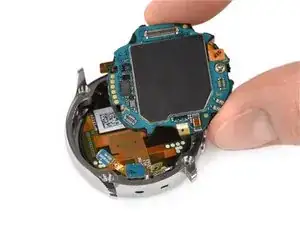
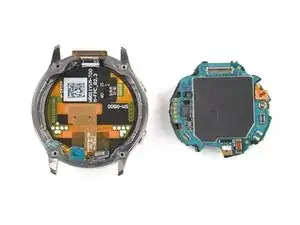
    • Soulevez et ôtez le module central.

Conclusion

Pour remontre votre montre, suivez les instructions ci-dessus en sens inverse.

Tobias Isakeit

Membre depuis le 31/03/14

122202 Réputation

0 commentaires