Introduction

This guide will instruct you how to remove and replace the disk drive in your Sony Vaio VGN-FS640.

  1. Mus4yXDUPwq5Ejas
    • Turn off the laptop and disconnect any charging cables.

    • Flip the laptop over so that the Service Tag is shown at the top left corner.

  2. aOA3UbycFUPdMJP6
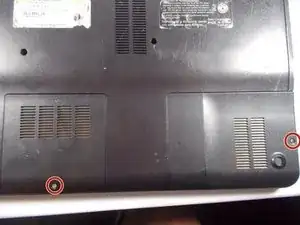
    • Remove the highlighted screws from the back of the laptop with a Phillips #0 Screwdriver.

  3. lytOXTkSZMPbDvfG
    • Remove the highlighted screws from the panels in the bottom right-hand corner of the laptop using the Phillips #0 Screwdriver.

  4. Hpt5AETTHCDiI1ou
    • Remove the two panels in the bottom right-hand corner by sliding in the direction of the arrows imprinted on the panels.

  5. BNSyUWaCVPNbDUvu
    • Remove the highlighted screws underneath the removed panels using the Phillips #0 Screwdriver.

  6. MHNtXGZfApxVhEwy
    • Carefully remove the hard drive from the panel in the bottom right-hand corner of the laptop.

  7. ml1l11SUpRHMsfEv
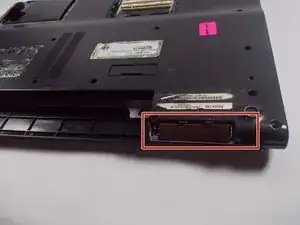
    • Locate the battery, located on the top side of the laptop to the right of the Service Tag .

    • Remove the battery by pressing inwards on the tabs on either side of the battery.

  8. PEbsciLsPWgFyjm5
    • Remove cover in the top left side of the laptop next to the battery by pulling it outwards.

  9. YDrjFHElQuiokvEo
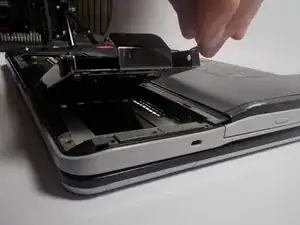
    • Remove the backplate of the laptop by pulling it away from the laptop.

  10. CYpg3c2POYmmrZvi
    CYpg3c2POYmmrZvi
    gNXqvJNSNTfvST5c
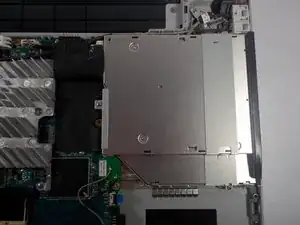
    • Unscrew the screws holding in the CD/ DVD drive.

  11. xiLUpH6F3BMXoPO1
    xiLUpH6F3BMXoPO1
    K4WWYyFoD2cuInaZ
    • Remove the CD/ DVD drive by gently lifting it up and out of the laptop.

  12. c6jKFDMBsTohSo6W
    c6jKFDMBsTohSo6W
    XHT5MLXbgGd3lQHY
    • Get the new CD/ DVD drive.

    • Make sure that the new CD/ DVD drive is compatable with the Vaio VGRFS640

    • Sony no-longer has a list of compatable drivers, however the original driver can be found here under optical drive.

Conclusion

To reassemble your device, follow these instructions in reverse order.
Geoffrey

Membre depuis le 28/03/14

252 Réputation

0 commentaires