Introduction

  1. saYMf2Vo5JVe4TBJ
    saYMf2Vo5JVe4TBJ
    h2RWhvpbeb6VjVMD
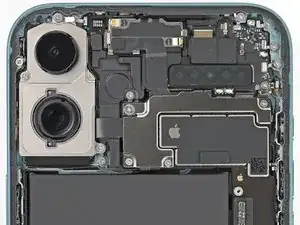
    • Remove the four screws securing the upper connector cover:

    • Two 1.4 mm-long Phillips screws

    • One 3.5 mm-long Phillips screw

    • One 1.0 mm-long tri-point Y000 screw

  2. mXAk1Q6XPoJTdLxG
    mXAk1Q6XPoJTdLxG
    LwLWLHqCTAKXuuZA
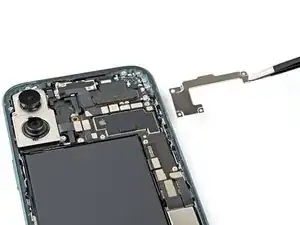
    • Use tweezers or your fingers to remove the upper connector cover.

  3. Wy1pS5LgPEAfychE
    Wy1pS5LgPEAfychE
    XHfRgxSC3XFA3Qep
  4. IlECLEnnTXDqJTYk
    IlECLEnnTXDqJTYk
    1QQe3QyBPRArDtnZ
    gMWrVLwe4IfMW16B
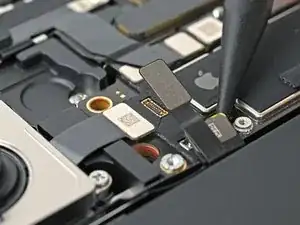
    • Disconnect the two rear camera press connectors, located underneath and to the left of the power/Camera Control button connector.

  5. DLYeDwaVRwUQrmHx
    DLYeDwaVRwUQrmHx
    PMaeKVD4dmrAtNPe
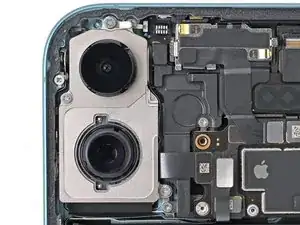
    • Use your Phillips screwdriver to remove the three screws securing the rear cameras:

    • One 3.2 mm‑long screw

    • One 4.7 mm‑long screw

    • One 2.4 mm‑long screw

  6. CdhqtKtteFLPwPWc
    CdhqtKtteFLPwPWc
    TjHCKW3KV66HWYpo
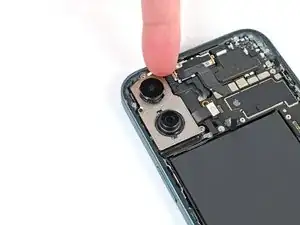
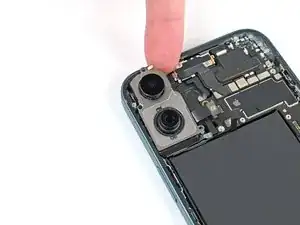
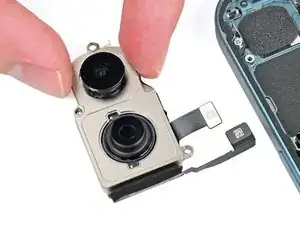
    • Use a spudger or clean fingertip to pry up the top edge of the rear cameras until you can grab them with your fingers.

  7. djxH2ZZPPOJbmlLu
    djxH2ZZPPOJbmlLu
    uyukiLvxPBvAegnI
    vCduZXXvMVdrorEs
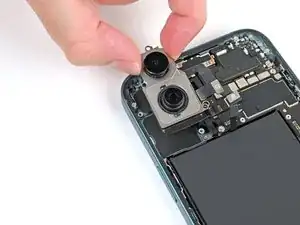
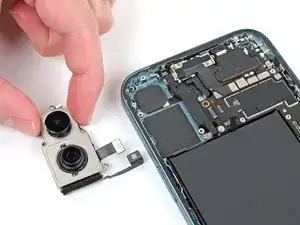
    • Lift the cameras straight up, then pull them towards the top of the phone to remove them.

    • During reassembly, make sure the camera cables route in the channel above the battery.

Conclusion

To reassemble your device, follow these instructions in reverse order.

Nick Schultz

Membre depuis le 24/03/24

13231 Réputation

0 commentaires