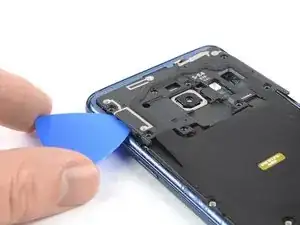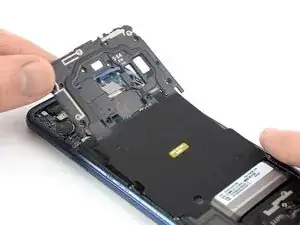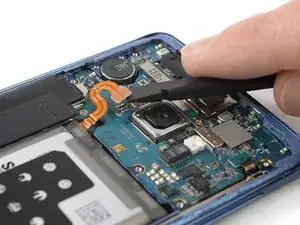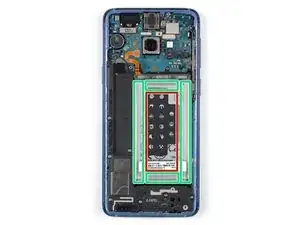
Introduction

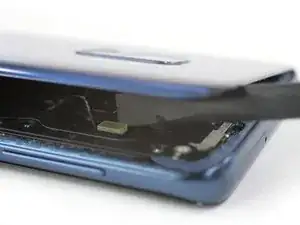
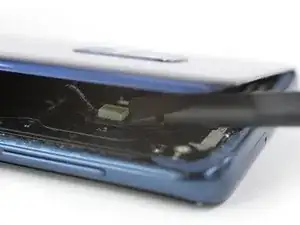
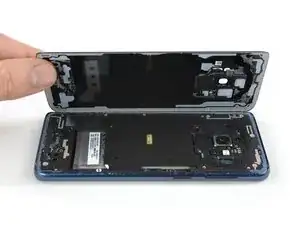
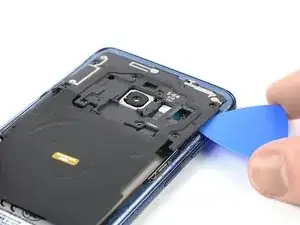
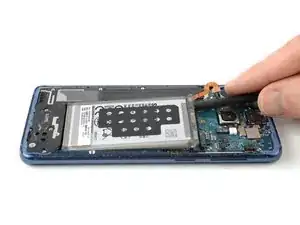
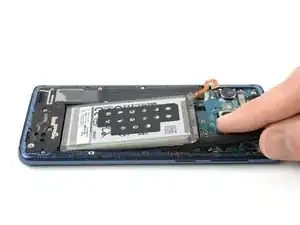
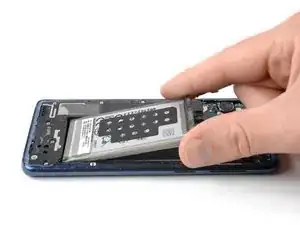
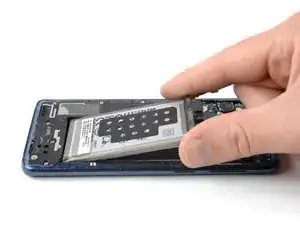
Consultez ce tutoriel pour remplacer la batterie de votre Samsung Galaxy S9.

Ouvrir le Samsung Galaxy S9 endommagera les joints étanches de l'appareil. Si vous ne les remplacez pas, votre téléphone fonctionnera normalement, mais ne sera plus étanche.

Avant de démonter vote téléphone, déchargez la batterie en dessous de 25 %. Si votre batterie est gonflée, ne chauffez pas votre téléphone. Les batteries gonflées peuvent être très dangereuses, mettez donc des lunettes de protection et prenez vos précautions. Ou adressez-vous à un professionnel si vous ne vous êtes pas sûr de savoir comment faire.

Vous aurez besoin d'adhésif de remplacement pour rattacher les composants lors du remontage de l'appareil.

  1. 1kgTQZdMscAZ2YrZ
    • Éteignez votre téléphone avant de commencer.

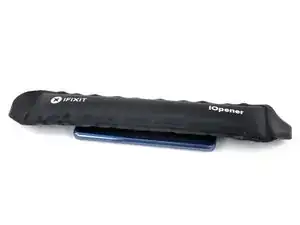
    • Posez un iOpener chaud sur un des bords longs du téléphone pour faire ramollir l'adhésif sous la coque arrière. Laissez l'iOpener agir pendant au moins deux minutes.

    • Vous devrez peut-être répéter cette opération plusieurs fois au cours de la procédure jusqu'à ce que l'adhésif soit suffisamment chaud et mou. Respectez les instructions de l'iOpener pour éviter toute surchauffe.

    • La colle du Samsung Galaxy S9 est très forte. Vous pouvez également vous servir d'un sèche-cheveux, d'un pistolet à air chaud ou d'une plaque chauffante, si vous n'arrivez pas à ouvrir votre appareil avec l'iOpener. Faites attention à ne pas surchauffer le téléphone : l'écran AMOLED et la batterie sont tous deux sensibles à la chaleur.

    Nightmare. Impossible to get the back off so far. Being trying using the iOpener with hair dryer for last 1hr. No chance.

    Chris Bunney -

    You’re right Chris. I’ve tried on 3 separate occasions now and haven’t been able to budge that back. All that has happened is the pick has taken a piece out of the glass back leaving a rough edge now.

    grahamcatto -

    it was not easy but doable.

    Clinton Stark -

    It’s difficult, but the trick I did to get it was to wrap the hot iOpener around a bottom corner, apply the suction cup, then I covered the opener and phone with a paper plate, better insulating the area. Then I set my blow dryer to high heat and low velocity and heated the area under the plate for about a minute. Right after turning off the blower, I took off the plate and pulled the suction cup with a cutter at hand. You’ll hear a bit of a cracking/popping noise when the adhesive is starting to give, just apply a little more force and push the cutter at the seam. This method worked great for me, so good luck and just keep at it — you’ve got this!

    Nicholas Weger -

    I used nearly boiling water in a storage zip bag on the phone for 10 minutes. I can’t really recommend this method, but thankfully the bag did not leak - an iOpener is probably a much better way to go. Regardless, the bag covered the entire back of the phone, and the phone was too hot to hold, but I still could not get the glass to budge with the suction cup after struggling with it for about an hour and multiple reheats. I ended up epoxying a 2”x2” square of PVC board to the bottom of the cover and built a relatively complex fixture that pulled on the PVC with the turn of a screw while it held down the frame by the edges. After heating the edges up again It did lift the glass enough to get a pick underneath it, but it cracked the glass and it was a pain to slide a pick around the edge while the glass was cracking all the way around. Once I finally got all the glass off, I spent the next 30 minutes (which is what this entire process is supposed to take… what a joke!) cleaning the adhesive off the phone.

    drbenton815 -

    Heavy Duty Heat Gun from popular discount tool store for the win!

    Jesse Meyer -

    Well, it is not obvious how to do this. I have no iOpener, but a heat cushion for remedy hurting muscles and sometimes a backpain. It is filled with grain of some kind and it is to be heated in a microwave oven for about 3 minutes. After that I enveloped this cushion round the phone and brewed myself a cup of tea. After ten miutes the phone was warm (almost hot) and I was able to press the tip of a small (very small) knife above the charging port into the connection between the phone body and the backplate. A very small opening emerged slowly (this is the critical point in this process) and I was able to start using the iFixit opening picks. It became obvious to me that the opening picks are too blunt to achive this with them. But after starting carefully with the (very small and very sharp) knife, everything went straight forward. Thou I had to give the phone a second heatpush with my heat cushion before the backplate came loose.

    borutberg -

    I used my 3D printer heat bed and heated it to 90 Celcius to succeed.

    gahute -

    It took about 3 minutes on my 90 C printbed to get the first pick in. If the suction cup gives up before the adhesive does, try using some Isopropyl alcohol to clean the back of the phone, and it should stick better. Also, don't apply heat to the screen, just in case that wasn't clear.

    Evan Newman -

    Used a corn bag (usually used for sore muscles) and incased the phone. It was hot to the touch, but it did the trick. Also needed a knife to have a small enough edge to start prying the back off and get the adhesive to finally pop.

    Laurie Hallberg -

    Don't Forget Step 0! Turn the phone Off and remove the SIM card tray. just to be safe, I'd recommend making a full backup of your phone onto a micro SD card in case the worst should happen. also, make sure anyone who needs to contact you knows you aren't currently available at your phone number.

    Evan Newman -

    We went for a hairdryer. Put it on hot, low blow and put the head right up to the corner. Took maybe 5 minutes per corner!

    Robert Tomohamat -

    Removing the back wasn't too difficult on my phone: several rounds of heating with the iOpener, applying gentle pressure with the suction cup, and eventually a corner lifted up without much force and I could easily slide a pick in. From there it was very straightforward and I had no trouble sliding the picks around and removing the back. The battery removal was much harder in comparison (especially as the iOpener burst when reheating in the microwave for the battery, despite following the time instructions).

    Less eWaste -

  2. UMheV4mJ1oAUmBxF
    • Au cours des étapes suivantes, vous allez trancher l'adhésif qui fixe la coque arrière.

    • L'image illustre la répartition de l'adhésif à l'intérieur de la coque arrière.

    • L'adhésif n'a pas la même épaisseur partout :

    • Larges bandes d'adhésif

    • Bandes étroites d'adhésif

    • Évitez de faire levier ou de couper dans cette zone à cause de la nappe fragile du lecteur d'empreintes digitales.

    I ran into a chunk of adhesive that was in the red zone right next to where the connector was. Be careful, cut slow, I managed to make it through my working my way through things that felt like foam.

    Matthew Speltz -

  3. cYTOtfNNpFicUNlr
    cYTOtfNNpFicUNlr
    cxj3bIrA5VLxR3uN
    NgOWRk2QjBVTiMGG
    • Si la vitre arrière du téléphone est fissurée, la ventouse risque de ne pas adhérer. Essayez de la soulever avec du ruban adhésif robuste. Ou bien collez la ventouse à la vitre avec de la super glue et laissez sécher avant de continuer.

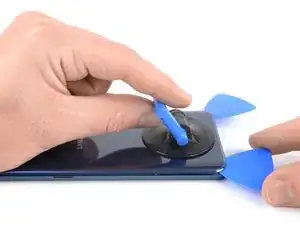
    • Posez une ventouse sur la coque arrière.

    • Soulevez le bord inférieur de la coque arrière avec votre ventouse pour ouvrir un léger espace entre la coque arrière et le châssis.

    • Vous devrez insister un peu, mais il suffit juste d'ouvrir un très léger espace avec la ventouse afin d'y insérer un médiator. Si vous avez de mal, faites chauffer une fois de plus, pour continuer à faire ramollir l'adhésif, puis recommencez. L'adhésif refroidit très vite, vous devrez donc peut-être vous y reprendre plusieurs fois.

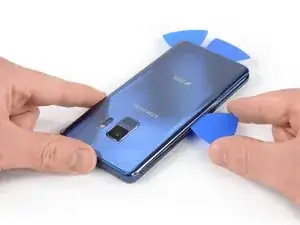
    • Insérez un médiator dans l'espace et faites-le glisser vers le coin inférieur droit.

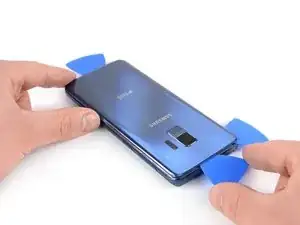
    • Introduisez un deuxième médiator et faites-le glisser vers le coin inférieur gauche.

    • Insérez un troisième médiator pour empêcher l'adhésif d'adhérer de nouveau pendant le reste de la procédure de retrait.

    The manufacturer obviously doesn't want owners to replace the battery, or they would have a simple method like they did in the past !!! They would rather have you throw it away and replace the phone !!!!

    johnbriand3 -

    Well. I guess so!

    I was so looking forward to doing this.

    What a shame this type of manufacturing occurs!

    😭

    From a do it yourself person.

    357CLOUDY Black Feather -

  4. BXtfQ1LDUf5NLGK4
    BXtfQ1LDUf5NLGK4
    OpVg1UG1kJBVEC2s
    • En veillant à n'en insérer que la pointe, parcourez avec un médiator tout le côté gauche, de bas en haut.

    • Faites glisser le médiator le long du coin supérieur et laissez-l'y pour empêcher l'adhésif de coller de nouveau.

  5. ohPPeyjgwHpkhFTo
    ohPPeyjgwHpkhFTo
    rrs2QwQFtbnUXIep
    XqbwCYYfTJdsJTJt
    • Progressez avec le médiator le long du côté droit, de bas en haut.

    • Refaites chauffer le tout si l'adhésif durcit trop. La coque arrière est soumise à de fortes tensions lors de la procédure de retrait et risque de se casser si l'adhésif est trop dur.

    • Faites glisser le médiator le long du coin et coupez la dernière bande d'adhésif en haut du téléphone.

    • N'ouvrez pas encore complètement le téléphone. La fragile nappe du lecteur d'empreintes digitales relie toujours la coque arrière à la carte mère.

  6. xRgwe3MhSpuWPPfR
    xRgwe3MhSpuWPPfR
    RscxILw5ESaJgFSd
    • Soulevez délicatement le bord de la vitre arrière, du côté du bouton de volume.

    • Prenez le bout plat d'une spatule (spudger) pour soulever et débrancher la nappe du lecteur d'empreintes digitales.

    Bij mij kwam de vingerafdruk sensor los van de glazen achterkant

    Thomas Apol -

  7. yqSZnkHjRsyOvxQu
    • Ôtez la vitre arrière.

    • Lors du remontage, consultez ce tutoriel pour remplacer l'adhésif et réinstaller la coque arrière.

    • Si vous souhaitez remplacer votre coque arrière, consultez ce tutoriel pour transférer le joint de la caméra arrière, qui inclut le lecteur d'empreintes digitales.

  8. Vvo2YZwFECCXcjMS
    • Dévissez les huit vis cruciformes #00 de 4 mm.

    I think the #000 fits better!

    Robin Vasdev -

    The second and fourth screws on the bottom row are a little shorter at 2mm ( I measure the others as 3mm). Worth some care to put the screws back in the same holes as they came from. (SM-G960U)

    Will Smart -

    Hi Will,

    thank you for mentioning! On our model the “SM-G960XU” all screws have the same length (4 mm). However this might differ between different models and is definitely something to keep an eye on during repairs.

    Dominik Schnabelrauch -

  9. BUAsmJfkKIXGByvX
    BUAsmJfkKIXGByvX
    DQeMTAsidxQDQUEf
    • Insérez un médiator sous le bord droit du cache en plastique qui abrite l'antenne NFC et la bobine de recharge.

    • Faites levier avec le médiator ou faites-le pivoter pour ouvrir les clips en plastique qui fixent la coque.

  10. 4o161mSFdXjKHMTc
    4o161mSFdXjKHMTc
    JuCCOj4P44srPYH1
    • Insérez un médiator sous le bord gauche du cache en plastique.

    • Faites levier ou pivoter pour ouvrir les clips en plastique qui fixent la coque.

  11. UdvIKepRpT5jbDR1
    • Retirez la coque en plastique qui comprend l'antenne NFC et la bobine de recharge.

  12. dkvKU3YuwKLleNEo
    • Prenez l'extrémité plate d'une spatule pour soulever et débrancher la nappe de la batterie.

  13. LK1AGiNsDgB6E2Op
    LK1AGiNsDgB6E2Op
    Vy5dYmAEf1vlDGvD
    • Servez-vous d'un iOpener pour faire ramollir l'adhésif sous la batterie. Posez l'iOpener et laissez-le agir pendant au moins deux minutes.

    • Au cours de l'étape suivante, faites uniquement levier avec votre spatule dans les zones indiquées en vert, où la batterie est collée.

    • Évitez cette partie. Il y a un trou dans le châssis interne, juste en dessous de la batterie et vous risquez d'abîmer l'écran à travers ce trou.

    I really struggled with this step. The iOpener provided burst when heating up for this stage, so I ended up using 75°C water in a small-but-strong ziplock bag (I first tried hot water from the tap, but that wasn't warm enough). Not ideal, but I had no other option available. Samsung had used a lot of glue under the battery, and it's not something you want to force with a spudger. I did get there eventually, but it was pretty unpleasant trying to avoid puncturing a potentially explosive battery.

    I did not replace the glue when installing the new battery; it seems pretty well held in place without glue, and there's no way I want to go through that process again.

    Less eWaste -

  14. tYpkTWkBR6gIfJ2g
    tYpkTWkBR6gIfJ2g
    eMcleb2ramBmLSSg
    • Si vous avez du mal à soulever la batterie, il est possible que l'adhésif n'ait pas assez ramolli. Vous pouvez appliquer quelques gouttes d'alcool isopropylique sous chaque coin de la batterie et laisser pénétrer et agir pendant quelques minutes pour faire ramollir la colle.

    • Faites de votre mieux pour ne pas déformer la batterie lors de la procédure de retrait qui suit. Une batterie lithium-ion à carapace molle endommagée risque de laisser s'échapper des substances chimiques dangereuses, de prendre feu, voire même d'exploser. Ne forcez pas trop et ne prenez pas d'outils métalliques pour faire levier sur la batterie.

    • Insérez l'extrémité plate d'une spatule sous le coin supérieur gauche de la batterie, là où la nappe se trouve, et commencez à faire levier.

    • Faites céder l'adhésif avec la spatule en progressant le long du côté gauche, vers le bas.

    This step was pretty difficult. Heat alone didn't seem sufficient to loosen the glue, so I used some rubbing alcohol and the spudger to try to deliver the alcohol directly where needed. I mostly focused on the top left of the battery, where the cable is, since the instructions say to start loosening there. It eventually loosened it enough to remove the battery. The spudger tore through the outer casing of the battery near the cable and that worried me, but nothing bad happened.

    Tom Wallace -

  15. OawyTUmk3cRgqqWf
    • Insérez la spatule sous le coin supérieur droit de la batterie et soulevez.

  16. CR62uDVTLPWaC5Qs
    • Ôtez la batterie.

    • Ne réutilisez pas la batterie après l'avoir retirée, cela pourrait être dangereux. Remplacez-la par une nouvelle.

    • Pour installer une nouvelle batterie et ses bandes adhésives, suivez ce tutoriel.

    I highly recommend just using some double-sided tape to re-attach the new battery. The old one was a complete pain in the butt to remove. the battery adhesive is almost as annoying as the rear glass adhesive.

    Evan Newman -

    I also struggled with this, and I recommend just not using anything at all but just putting the new battery in and closing it all back up. The tolerances in construction are very fine, and there's no way that battery is moving anywhere once the NFC coil and back are replaced. (Would be good to know if I'm missing something here, though?)

    (As annoying as all the stupid glue was, you have to admire Samsung's build quality here -- it's a very well-made phone inside, and there's not a fraction of a mm to spare.)

    Less eWaste -

    The instructions are good and then it works. The fact that there are lots of adhesive panels in the set is of course perfect for assembling. I'm now curious to see how long the battery will last and charge it according to the instructions. I managed to get the back cover off easily with a lot of heat.

    A well thought-out set - battery with the kit.

    Thanks
    Marc

    Marc Rudolph -

Conclusion

Pour remonter votre appareil, suivez ces instructions en sens inverse.

Si possible, allumez votre téléphone et testez votre réparation avant de reposer de l'adhésif et sceller à nouveau le téléphone.

Pour des performances optimales, calibrez votre nouvelle batterie après avoir terminé ce tutoriel.

Déposez vos déchets électroniques dans un centre de recyclage certifié.

La réparation ne s'est pas déroulée comme prévu ? Consultez notre forum de réponses pour obtenir de l'aide au diagnostic.

Dominik Schnabelrauch

Membre depuis le 23/11/16

224029 Réputation

27 commentaires

An exceptionally useful, and dare I add - well-written - fixit.

Doug Davis -

Merci ifixit.

Mais je n ais pas compris la deconnection du NFC, es une nappe. Je ne comprends pas.

Di Da -

Bonjour @Di Da, vous trouverez la partie qui parle de la démontage du coque / de la cache en plastique qui abrite l'antenne NFC et la bobine de recharge dans les étapes 9 à 11. Au fait, la cache en plastique et la nappe sont UNE pièce ensemble, on ne peut pas les séparer et dès que vous démontez la cache, la nappe va elle aussi sortir automatiquement. Elle n’est lié que par quelques contacts, vous n’avez pas besoin de déconnecter ceux-ci, ils se séparent automatiquement quand vous retirez la coque.

Sandra Hiller -

Wenn nach Abschluss der Reparatur der Fingerabdrucksensor nicht funktioniert muss man in den Restore Modus des Handy gehen.

Dazu das Smartphone an den Lader hängen und das Gerät ausschalten.

Dannach die Bixby + Power + Lauter Taste gedrückt halten bis das Samsung Logo erscheint.

In dem Menü den Punkt “Wipe Cache Partition” auswählen mit Lauter / Leiser und mit Power die Auswahl bestätigen.

Die Auswahl nochmal mit Yes bestätigen und warten bis das Gerät die Cache Partition gelöscht hat und das Gerät neu starten.

Dannach sollte der Fingerabdrucksensor wie gewohnt funktionieren.

Sebastian Coenen -

Why does the guide stop? How am I supposed to use the adhesive??

Mitchell steindler -

Hi Mitchell,

the last step offers a guide to install an adhesive. Hope that helps. Otherwise, all our guides are “re-assemble in reverse order”.

Tobias Isakeit -

For what parts? There’s multiple sets of adhesive on this device, and I would personally recommend applying the adhesive the same way that it was applied on the original battery.

Kaleb White -

You can attach it to the battery or where the batter is placed and your done and just work backwards after .

Charlie S -

I’ve bought a replacement battery for my S9 to do this but it hasn’t come with any adhesive. Which one(s) do I need any where can I buy it?

danreilly -

Hi danreilly,

in case you don’t want to buy custom cut adhesive for this, you can use regular double sided adhesive tape.

Dominik Schnabelrauch -

Guide was definitely helpful. Having some tips or comments for assembly would be helpful particularly for reattaching the fingerprint sensor. A magnifying lens for the tiny pin connections is recommended.

Kurt D -

Amazing description.

...think I better leave it for the pro's

Thank you!

Chris Newman -

Why did the cell phone company's make it so hard to replace a battery...let me guess...so you have to buy a new phone instead of swapping out a battery like the old cell phones

jasonbutts2332 -

Schön und gut, dass man das Handy in ein paar Minuten auf bekommt. Nur wird hier leider nicht erwähnt, dass es Stunden dauert, die alten Klebereste zu entfernen.

Dominik Schmies -

Hi, das mit dem Kleber entfernen ist tatsächlich etwas aufwändiger. Allerdings weisen wir in Schritt 7 (Rückabdeckung) und Schritt 16 (Akku) darauf hin (separater guide). Dieser Guide hier ist mit einer Dauer von bis zu 2h angegeben. Je nach Gründlichkeit der reparierenden Person und Alter des Klebstoffs kann es auch etwas länger dauern. Ich hoffe du warst dennoch erfolgreich und es hat dir nicht zu sehr deine Zeitplanung durcheinander gebracht.

Tobias Isakeit -

Hi David,
please see the link in the first step. It’ll lead you to the guide for how to prepare an iOpener.
Yes, you can heat it in a water bath.

Tobias Isakeit -

there NEEDS top be some sort of instructions for applying the precut adhesive per the individual product, NOT just a basic overview that covers multiple devices....., at the very least, some pictures actually showing what direction, orientation, etc. it is very easy to mess it up. having the instructions basically end at the disassembly is not ok. it is very frustrating. I did end up getting my S9 reassembled after placing the adhesive around the camera backwards, thankfully I caught the issue before final assembly. Besides the lack of instructions on assembly, the tools worked flawlessly and disassembly was a breeze! Time will tell how the new battery holds up! Thanks for making quality products!

Matt Kiefer -

Hi.

The difficult part of this tear down is removing the back cover with the IOpener. I used a heat gun instead of the IOpener. I had to use a opening tool which is a very thin metal to pry open the back lid. I then was able to remove the back cover with ease. I used a heat gun to remove the battery. Another time consuming part was removing the old adhesive from the back cover. Mark the top and bottom of the rear cover (Inside)with a white marker pen so that you know where exactly to place the new adhesive. I used alcohol to clean the areas prior to placing the new adhesive.

You are going to need a second pair of hands to help place the adhesive that goes around the phone. Other than that, a piece of cake. It took me 2 hours to complete the battery replacement. Remember to power the phone up before putting the rear cover back on just in case the battery cable did not seated correctly.

Hope this comment helps.

rordaj -

All went well for me, but I didn't replace either set of adhesives (battery or back panel). I figure the battery will be fine without it, and the old adhesive on the back panel was more than enough to re-adhere. With the phone in a case anyway, it's perfectly fine. The trade-off for being able to more easily replace the battery again is losing waterproofing, but I've never dropped a phone in water and don't plan to start now. And I doubt the very generic battery supplied in this kit (without any manufacturing date) will last a year.

I don't know how unusual my phone was, but I'm surprised at the number of reports of back panel breakages. Once the back is warm enough, all the resistance of the glue disappears and you don't need to apply much force through the suction cup at all. Just have patience, keep warming the edges, and although it takes a long time you'll instantly feel it when you get there.

Less eWaste -

Das Guide hat sehr beim Akku Austausch geholfen vorallem mit dem Kit (Schraubenzieher, iOpener und mehr) machte es den Austausch einwandfrei.

Danke.

Max K. -

had a swollen battery so getting in was easy. come to think of it all, everything was easy and from opening to finish took 45 minutes.

There, good as new and i even applied one of the snazzy i fixed it stickers. thank you ifixit for the nifty kit and i will use the tools for

future projects;-P

Allen Crawford -

Bei mir hat sich beim Lösen der Rückseite auch gleich der Fingerabdrucksensor mit von der Kameraabdeckung gelöst.

Leider liegt dem Set kein Kleber für den Fingerabdrucksensor bei sondern nur für die Kameraabdeckung. Wie habt ihr das gelöst? Einfach den alten Kleber drauf lassen und davon ausgehen das dass Handy hier nicht mahr richtig dicht ist?

Ansonsten Danke für die prima Beschreibung.

20min fürs Öffnen und min. 2h für all den Kleber...

Daniel-le -

Can't order anything here

m l -

it shows - "Your order total has changed. Review and try again." again and again

m l -

My phone shows a defect of the USB connector (water). If I exchange the battery, will it stay as it is? Should I check any additional interface?

Alexis -